Showing posts with label pocketable. Show all posts

Canon ups their game for 2012...

On Thursday, April 26, 2012 0 comments

This is the hot season for new camera introductions to be entering the market and 2012 is shaping up to be one of the hottest years in camera technologies in quite some time. The fact is that camera makers are having a bit of a hard time. There is no question that more and more people are taking pictures with their smart-phones and some of the latest camera phones take some impressive pictures, especially in well lit environments.

Just check out some unretouched pictures from Apple's latest iPhone 4s!


So the camera manufacturers are creating additional value propositions as consumers move up the scale beyond standard point-n-shot cameras. And I recently wrote a note about Nikon's big 2012 line-up and I see the same level of intensity coming from other manufacturers...especially Canon and Panasonic.

Let's look at some of the hotness recently released from Canon...

Canon PowerShot S100
Canon started out late last year with the introduction of the successor to the popular S90/S95 compact performance cameras. This camera features a high-end array of features including an all-new 12.1 megapixel image sensor, bright F2.0 lens and powerful new image processing technology that is a substantial upgrade from their previous models. You've heard me rave about the S95 and this S100 (I have both)...and I have to say that the latest S100 is a great camera, it is a marvel of small size and very good image quality especially when taking nice, bright pictures in the shorter zoom range (1x-3x). This lens lets in a lot of light for a camera so small and allows you to take many indoor photos even without a flash. The addition of a slightly wider-angle (24mm) is a nice boon but increasing the zoom to 5x did introduce some compromises on the the brightness on the latter end of the telephoto range. I wouldn't use this new level of zoom unless you are outdoors on a nice sunny day or well illuminated environment.

Another popular use for this camera at our household is as our "go to" video recorder. And the new S100 adds the ability to quietly zoom while recordings which is a very nice addition. We find that 80-90 percent of our family video shoots, we use this camera over pulling out a full camcorder. The S100 introduced full 1080p video resolution versus our old S95 at 720p.

Sadly, the battery life has gone backwards on the S100 from the S95 which is a bit of a shame. But I still highly recommend this camera, it really satisfies the "you can only take a picture, if you have a camera" and the S100's size is truly pocketable. The images can frequently be confused for pictures from my higher-end digital SLR cameras. This is something I carry around with me all the time. And most of the pictures I share with friends and family come from this camera.

If you have the S95, it is really not enough of an upgrade to justify the move. The update includes a longer 5x zoom starting with a respectably wide 24mm and going all the way up to 120mm, GPS and 1080p video capture with zoom. If you don't have a quality, easy to use and pocketable camera...this is the one for you.

Canon PowerShot G1X
In an effort to fill the void between "point and shoot" and "digital SLR" cameras, Canon is taking the approach of a compact, all-in-one design (camera body and integrated lens) where you get an all-new 1.5 inch 14 megapixel image sensor that is substantially larger than your traditional compact cameras (approaching Digital SLR size) and an integrated 28mm wide angle / 4x zoom lens allows this camera to be a good compliment to someone looking for a second camera to support their larger DSLR camera.

Sample from Canon G1X
I've played with this camera a far bit and have mixed feelings about this new, first-generation offering. Canon is taking a different tack versus their competitors that are offering small, professional-styled compacts with interchangeable lens. Canon integrated the lens and while this adds a lot of convenience in a compact form factor, I also believe this is giving the camera some serious weaknesses. The first thing you will notice is that focusing is not as fast and crisp as some of the competitor offerings. Where this camera shines though is in its large sensor that captures light more cleanly thus affording some very impressive low-light pictures and bright, clean pictures overall. See sample to the right.

I'd say this camera feels a bit first generation and has huge potential to improve over the years. For now I would lean toward the Canon S100 which is MUCH more pocketable if you want a small, secondary camera that offers a decent amount of control. Or if you looking for more of a step up than the S100 offers, I would recommend the Canon G12.

Canon 5D Mark III
Now we are really leaping into the upper regions of the Canon camera universe with the newly introduced 5D Mark III. This is a semi or professional digital SLR (DSLR) camera that offers an impressive 22 megapixel full-frame sensor. This is a very large sensor, most sensors in the consumer DSLR realm are "cropped" and only have a fraction of the size of a full-frame (same image sensor real estate equivalent to a 35mm film photograph).

Though it looks quite similar to the Canon 5D Mark II (note: this is my current "go-to" camera), the 5DM3 is an all-new design on the inside and really leverages some innovations in the Canon crop sensor space from the hugely successful Canon 7D. But this new camera one ups almost ever aspect of the previous Canons before it. The new 5DM3 leverages the 61 point Auto-Focus system from the top-end Canon 1DX and offers a huge ISO range of 100-25,600 to allow for some impressive low-light and high-speed photography.


At the core is a new Canon Digic 5+ processor which adds much needed horsepower to a camera handling large images. You will also find support for UDMA 7 Compact Flash cards as well as dual memory card slots accommodating Compact Flash and SDXC cards.

It is really hard to compare the 5DM3 versus the 5DM2. While they look almost identical except for a few tweaks here and there. The insides are completely different and really have evolved based on the needs and feedback of professionals to provide a fast and adaptable camera. The old 5DM2 was focused on megapixels and image clarity that proved a great landscape camera but the older camera was a bit slow on its focus. This new camera is notably more accurate and faster.

While I will go into a more in-depth review in the near future, suffice it to say, I am impressed with this new camera and it is right in my wheelhouse of features and capabilities. But I am a bit torn between the Canon and its direct competitor...the new Nikon D800. I do tend to prefer the color gamut of the Canon over the Nikon's almost surgical imagery.

My personal camera shopping dilema...

Typically I like to "make a recommendation" on this blog. I tend to point out my personal preferences and point out why I feel that way. But on this last category of product, I just haven't pulled the trigger on either yet as I need to spend a bit more time with both the Canon 5DM3 and the Nikon D800 before deciding.

Regarding price, the Canon 5DM3 and all it's horsepower comes at a price...$3,499 for just the body vs the original 5DM2s $2,699! There is no question, the 5DM3 is a much needed upgrade. I would love the improved speed, some notable improvements in some photographic technicals like how it handles color-fringe correction, metering and it's advanced focus system. And if you are vested in Canon lens...this is a great update and highly recommended. But I have both Canon and Nikon gear and from a pricing standpoint, the Nikon D800 is priced at $2,999 for the body and comes with an impressive 36 megapixel sensory plus all the other updates mentioned in my previous Nikon 2012 write-up. And my 5DM2 is still a solid performer. Hmmmm????

If you have some questions or thoughts about this, please comment.

More to come...


LarryLarry Pacey, award-winning designer tracks the latest news on consumer products, electronics, appliances, smart devices, networking and the gadget lifestyle.For the latest news follow me on:

------------------------------ OR -------------------------------


Please comment below and share your thoughts. If you have any feedback or questions, feel free to email me at wouldntmind@gmail.com.

Just my 2-cents,
Larry

Who needs a standalone GPS nowadays?

On Tuesday, November 8, 2011 4 comments

I'm a heavy GPS users. I enjoy knowing that I am taking the most direct/shortest travel time route. I use it even in my hometown to avoid traffic and construction. But while I am a fan, the technology is built into pretty much every phone sold today...so I've been wondering "How long will they continue to make a standalone GPS?" With the world of convergent technologies, I just figured these standalone devices won't be around much longer. But I still see them advertised, I see people using them and often wonder..."Don't you have a smartphone?"

So I thought I would dig in and see what you get with a modern, standalone GPS. I'm focused on the standard automotive/portable type of GPS. There are a slew of other options for marine, motorcycle, outdoor or fitness products that I am not covering in this review.

There seems to be three key features to the standard breed of GPS today. First many of them have Bluetooth features like providing the ability to sync your cell as a speakerphone. Another great addition is real-time traffic information and routing options. And lastly, a new breed of voice command GPS units that make them ideal for hands-free use in a moving vehicle.

So I'm presuming with this write-up that you have a need for such a device and are starting there. You have a vehicle that did not come with navigation or have an "on-the-go" need for GPS guidance that a smartdevice doesn't cover. One benefit might be that you don't use "data" when traveling abroad and don't want to call up Google Maps on your phone. Data plans when traveling abroad are extremely cost prohibitive. And there are some smartphone solutions which I'll cover in a future article.

Under $200?
Nuvi 1490 LMT
My past experience has been with the Nuvi line from Garmin and found the 1400 series their popular line-up today. Last year's model the Nuvi 1490 LMT has been a runaway hit online and has garnered a lot of good buzz. It is an especially feature-rich product for the money. The large 5-inch diagonal LCD has a very readable resolution of 480x272. This product also features Bluetooth technology enabling hands-free calling. It retails for $260 but you can currently find it online in the sub-$200 price range. There are cheaper versions of this product but the LMT version includes Lifetime Map updates and real-time Traffic. The 1450LMT version is the same for under $170, if you can live without the Bluetooth hands-free features.

Overall I like the way information is displayed on this Garmin. The ability to preload 10 routes and saved waypoint can come in handy for long trips. The "lane assist" pops up a clear image of which lane you need to be in at major junctions along your travel plan. And the ecoRoute feature calculates the most fuel-efficient route and tracks your fuel usage.

Around a $100?
TomTom XXL 540S
This value GPS is not the latest model but proves to be a great buy at a street price under $100 (I've seen it for around $80 on occasion). You get a solid and reliable route finding product with a good 5-inch display. It is not the most user friendly but overall is a favorite for the price. It does an excellent job finding the fastest route and its Advance Lane Guidance clearly illustrates which lane you should be in. This base product does not offer Lifetime Map nor Traffic. The XXL 540TM model is available with traffic and map subscriptions for around $120 but once you get into this price range I would highly recommend the Garmin Nuvi 1350LMT for $130 online price. The Garmin has a slightly smaller 4.3" display but overall is a much nicer product.

Splurging on a GPS?
Garmin Nuvi 3490LMT
Nowadays it costs $1,000 or more to get navigation with a new car purchase, so $400 for the ultimate in a personal, vehicle GPS solution is a steal. If your car doesn't have navigation, this is a great add-on. Not only does it have all the must-have features like Lifetime Maps and Traffic, it is also voice activated and includes support for Bluetooth hands-free calls and reads your text messages out loud. Garmin's new Guidance 3.0 service offers an even more intuitive user-interface with pinch-to-zoom multi-touch features. Digital 3D Traffic provides real-time (every 30 seconds) updates and the system will work to dynamically route you around new traffic situations.

The 3490LMT is a sleek, attractive device that is 9mm thick and features a 4.3" monitor that displays landmarks and terrain in 3D.

TomTom Go Live 2535TM
In past years I have faulted TomTom for their user interfaces and it seemed like they were trying to appeal to the more geeky, gadget-savvy demographic. If you had fun tweaking several options to get where you wanted to go...their product was for you. The good news is TomTom has begun to make their products much more user friends and features some great advances in usability such as the "Google Local Search" and more intuitive setup screens found in their recently introduced TomTom Go Live 2535M. The device includes a 5-inch display and has a retail price of $300 and a street price around $270. To further aid your navigation needs, TomTom has included Voice Commands and Bluetooth hands-free calling. Their IQ Routes feature presents the fastest route based on the time and day of the week. I will say that the reason TomTom seems to have successful is their routing logic and I would say this continues to be true. The 2535M is a very reliable device that seems to do quite well in getting you from "Point A" to "Point B" pretty efficiently. The Live traffic information seems to be more up-to-date that the old ClearChannel FM subscription solutions of the past.

Smartdevice w/Built-in GPS?
Obviously most smartphones and tablets include a GPS in them today and feature an online mapping tool like Google Maps. But automated turn-by-turn with voice guidance tends to be an additional option in the form of a cell carrier extra feature or an app you need to download.

Goggle Maps for mobile "beta" is available for Android devices and features free turn-based GPS navigation. It includes 3D Maps, Offline functionality for areas you regularly travel, Voice Search, Street View and Traffic. All in all, it is a good, feature-rich but not a very flashy solution...and free for Android users. For non-Android users, Google Maps is just a mapping tool that can help you plan out your trip but lacks real-time updating and voice announcements.

I'll do a full write-up on the navigation software packages available for smart-devices in a future posting but currently I use Navigon for the iPhone in case you are curious.

Conclusion
Based on the mapset they each rely on there definitely seems to be a preference between Garmin in the US and TomTom in Europe but both products also work well in either part of the world. I really like the Garmin Nuvi interface and believe they represent the easiest products to use overall. The Nuvi 1490 LMT is a great product for the price but if you can live without some features check out the entire 1400 series for the right one for the dollars for you.

In closing, I do need to mention that both Garmin and TomTom offer voice packages for many of their GPS products so you can customize what your device sound like...or who they sound like. Both companies have Star Wars packs licensed from Lucasfilm - Garmin Star WarsTomTom Star Wars


Please be sure to comment below and share your experiences with these or other GPS/navigation products. You can also follow me on Twitter or Facebook.


If you have any comments or feedback, feel free to email me at wouldntmind@gmail.com.

My 2 cents,
Larry


Enhanced by Zemanta

iPhone 4S Shockingly Good Video Quality

On Wednesday, October 19, 2011 0 comments


A video shot on the iPhone 4S from Benjamin Dowie on Vimeo.
Some people may be under the false belief that the new iPhone 4s is just an "update". But when you spend some time with the new SIRI voice-command features, noticeably snapper speed flipping between apps and the new 8-megapixel camera with 1080p video...you start the get the full picture. This is not a new strategy for Apple. If you look at the Macbook Pro line of Apple laptops you will note that the overall look has not changed for many years but the product offering inside has. Most likely this is the road Apple is interested in pursuing with their iPhones as well.

That is not to say that they won't come out with a new configuration but from an operational efficiency standpoint, Apple will try to leverage the form-factor as long as it competitively can.

To demonstrate some of the video prowess of the iPhone 4S, Benjamin Dowie has shot some incredible footage to really highlight the smart-device's 1080p video capabilities. Benjamin is a professional videographer and was really impressed with the depth of field found in a smartphone's camera. He did tweak the colors while editing the footage in Final Cut (Apple's professional video editing) software.

W5RX8UDE6QXQ

Wireless Headphones - Why can't they make a great pair of Bluetooth earbuds?

On Tuesday, October 11, 2011 1 comments

Bang & Olufsen A8 Earphone...love them!

I have been on the lookout for a wireless/Bluetooth set of stereo headphones for quite some time. I love my Bang and Olufsen corded headphones but I would also love to cut the cord between my iPhone and my ears. Now the B&O headphones (est. $160) are not cheap either...but they deliver a sound quality and fit that I have found unmatched in the industry. And they look incredible...if a set of earphones can look incredible? Definitely worth checking out if your willing to spend the same money for your headphones as you did on your audio device!

But back to my quest for a great set of wireless headphones...

The industry hasn't really delivered on the promise with the past waves of Bluetooth headsets. Most are heavier than you'd want, awkward to wear, have uncomfortable cord things dangling down, something you have to clip on or just don't sound good. Another thing to consider is that a fair amount of people will want these for their workouts...so durability, solid fit, stay-in-place and sweat resistance will be key.

While I am on the topic of working out, if you didn't check out my write-up last week on fitness tech...be sure to check it out here.

Motorola S10-HD
Motorola S10-HD (est. $55) is the replacement for the somewhat popular S9 series. The headphones appear to have a quality construction and produce a rigid backplane that arches over and around the back of the neck. Some people would point out they are actually feel heavier than the previous version. For those of you into sports, the way these headphones wraparound your head, you can trust that they will probably stay in place. The design of the acoustic mesh, silicone seals and encased speakers help provide excellent sweat protection. I will say that the wrapping over the ears and thickness of the material over the ear, that wearing glasses is not too comfortable. The overall audio quality was just average throughout the range. Another challenge with this style of headset is when you are sitting in a tall-backed chair or car seat you may feel them pushing up against the back of your neck. These headphones include a microphone for taking calls as well. You can expect up to 8 hours of audio and 10 days of standby with the built-in batteries. They come with a wall charger and have a MicroUSB port in the headset for convenient charging.

LG Tone HBS-700
Another lessor known set of headphones of similar construction is produced by LG. The LG Tone (HBS-700 est. $55) has a main component that wraps around your neck but instead of the backplane fitted with the earbuds on the end, as you can see from the picture, the earbuds hang off the spine with a more traditional wires and buds configuration. The earbuds themselves store with the main unit via a very innovative magnets coupling on both ends. In a way this is more comfortable than the Motorola S10 and is very lightweight. Your experience my vary based on your level of working out but in general they should stay in place pretty well. I do think if you are jogging they could bounce around a bit but the good news is that the whole setup is designed to be water resistant which is key for those of you into a hearty workout. The LG unit is compatible with the Android BT Reader app that reads your incoming text messages in real-time. A nice feature is the multipoint support that allows you to pair with your computer or audio device and seamlessly switch to your phone to take a call. You should expect 8-10 hours of talk time and up to 15 days of standby.

Plantronics BackBeat 903+
Still sticking with the back of the head wrap motif, the Plantronics has a very solid reputation for delivering higher-end Bluetooth cell phone earpieces and the BackBeat 903+ (est. $45) stereo headphones deliver similar levels of performance. Built on Altec Lansings sound technology is definitely evident based on the audio fidelity which is on the higher end level of performance in this group. But there were two areas that the BackBeat fell backwards. One is on the microphone/voice quality, people I was talking to could tell I was not using the main iPhone microphone and the other was that this is not a multipoint device. Meaning that you couldn't pair this with separate audio, computer and cell phone.

Sony Ericsson HBH-IS800
Delivering a quality audio experience is the Sony Ericsson HBH-IS800 (est. $70). These earbuds delivered a rich audio sound with a decent bass response. They are incredibly small and lightweight. Though the control on the cord is small, you do notice that is dangles down on the left side where the module is which can be annoying. The noise-canceling feature worked well but callers could tell when you are on this headset as well. You can expect a relatively short talk time in the 3 to 4 hour range and standby for over 10 days. Small but not feature rich with good audio sums it up.

Jaybird Freedom
The Jaybird Freedom (est. $99) headphones represent the current state of technology and tries to address all the needs of a consumer of lightweight, wireless stereo headsets. They have developed a wide range of earbuds and accessories to address any type of fit. The Jaybird has condensed all the electronics into both earbud cases and still maintain a very small shape overall. These were designed to be worn while working out. I get mixed reports on the "staying in the ear" but they have an amazing life-time sweat proof warrant...which should bring some peace of mind. The product has a quality but plastic feel about it and a thoughtful execution throughout. You can adjust the cable between your ears to better fit your head. Battery life stands at 6 hours of talk time and . The audio quality is quite good with some decent bass response...only lagging behind the Plantronics and slight Sony.

Novero Rockaway
What re-triggered my look into this whole area of wireless headphones again was that some friends mentioned a forthcoming set from Novero (est. $79) called the Rockaway. Now traditionally Novero tries to develop fashion electronics, things that are suppose to be worn unnoticed. They make jewelry with the electronics hidden inside but typically they just looks like bejeweled electronics. But this new Bluetooth headset seems to just be pursuing the minimalist angle. Something I can strongly endorse. They look nice but we'll have to wait and see how they turn out in the coming weeks when they are released. I'll update you when I get a good sense on these.

Sennheiser MM-450
My Conclusion
I guess there is a reason that I don't have a Bluetooth headset currently. This really seems to not be an overly active area of development. There must be a lot of limitations (interference, components weight, cost, ergonomics, etc.) that are preventing people from really delivering a quality experience here. There are larger headphone solutions from Sennheiser and the like but I really was hoping for something smaller...more "Bluetooth" and "lightweight"...something in-line with the size of the B&O set I currently love dearly.

As it stands today I will probably stick with my current corded headphones. If I was needing to pick up a new set, I personally lean toward the Jaybird earbuds. The Plantronics are just too bulky and I don't know if I can deal with the necklace of a solution from LG. If you can live with the LG wrap around the neck...they were probably the nicest set here overall.

If you'd like a more in-depth review of the Jaybird...check out Matthew Miller's write-up on ZDnet.
If you'd like a more in-depth review of the LG Tone (HBS-700)...Nicole Lee's review on CNET.

Please follow me on Twitter or Facebook and if you like any of the products, please consider purchasing them through my links (most @ Amazon). If nothing else, the funds I generate off the site go to buying and testing other great products.

If you have any comments or feedback, feel free to email me at wouldntmind@gmail.com

Thx,
Larry


WANTED: More Smart Device Storage! Help my iPad out.

On Wednesday, September 14, 2011 0 comments

One of the main reasons I have not upgraded my original iPad to an iPad 2 is the fact that they both had the same maximum storage capacity...64 gigabytes. As it is currently I am having to choose what comes and goes on my iPad more than I would like. I really never know what I will need when I am on the road and I travel a great deal.


What is taking up most of my space on the iPad? Mostly apps and documents. Less than 4gb of video and that is the most painful part. I watch people enjoying TV shows and movies when they travel but I am hard pressed to have enough video content for the flight out let alone coming home as I am so constrained with the limited available storage and no direct memory expansion options (ie: memory cards or hard drive connectivity.


I clearly must not be the only person with this problem because there is so much talk today about cloud storage and streaming solutions in the media and from tons of different solutions providers. But one of the most challenging aspects of these streaming/online solutions is the need for being connected to the web. WiFi is not everywhere and seems to not be where I need it when I need it. My iPad does have 3G cellular connectivity but service can be spotty and bandwidth limitations do exist. So I am constantly on the quest for a personal storage solutions for the iPad and in theory any mobile smart device that can provide extra content no matter where I am.


To date, most of these solutions have looked a bit "hackery", in other words, not a lot of thought or engineering to make working through the physical limitations Apple has imposed on the iPad. And it is not just the iPad...tablet computing by its very nature is about mobility, convenience and simplicity. Simplicity to-date has meant limiting options for accessing and browsing data.


The general solutions for today rely on applications and their associated documents as "one". Very little has been done for universal solutions whereby a document is accessible by a multitude of applications. Yes, Dropbox, Goodreader and the like try to be a single solution for a universe of media types but in use they still have substantial limitations. There is also initiatives to develop standards to allow for multiple applications and solutions to view, edit and distribute compatible documents.


But there is a group of companies trying to solve my immediate problem of simply having extra storage for my iPad or smart devices in general, so let's dive in on a new trend of products rolling out that try to solve my dilemma.


Airstash
The first product I was watching this year was Airstash. Truth be told it came out a year ago but it was in a very early, almost crude stage and didn't warrant purchasing. But the crew over at Airstash have been busy and they have added a great deal of functionality and stability to the product. The product is pretty straightforward. Airstash is a USB SD card reader that has an embedded wireless web server to access the contents on any SD cards (up to 64 gigabytes). This device is the smallest of the bunch at 1.9 x 3.6 x 0.5-inches and cheapest at $99.99. 


So this device in essence could give you up to double the capacity for your iPad or smart device at any given time. And of course, you could carry multiple SD cards if you want to organize and/or sort the files appropriately if you need more storage capacity. 


From a physical standpoint, the product is pretty easy to understand. Plug the device into your computer to charge the battery (5 hours of streaming) on the device and copy files over to the SD card installed. You can put images, music, videos and documents. Your files are sharable via the Airstash's built in wifi server once you unplug it from the computer and turn it on. Multiple users (documentation claims up to 8 connections but only supports 3 audio/video streams at one time) can log into this device's wifi signal and access the files stored on the SD card via their web browser. This does bring up a couple issues though. First if you log onto this wifi signal, your smart device does not have access to the internet if wifi is your devices primary internet access point. Secondly, the wifi connection is limited to 802.11g which is substantially challenging for broadcasting higher resolution content bandwidth needs.


The Airstash does support a web developer standard protocol for making documents compatible with one another called WebDAV. And the team at Airstash are also offering a software development kit for app developers to natively support/leverage Airstash's content directly from their apps.


A recent announcement is that a next generation version is coming to market by Maxell who has partnered with Airstash to distribute the product going forward. This new version will most likely include an SD card as part of the package.


Kingston Wi-Drive 32GB
You may not be familiar Kingston but there's a good chance you have or use their products. Kingston is a well respected manufacturer of RAM memory and solid-state hard drives for computers as well as storage cards used in cameras. If something uses solid-state memory...there is a good chance Kingston's makes one. But the Wi-Drive is definitely one of their first consumer electronics offerings.


This device is specifically targeting the Apple smart device crowd. The only application to access the media on the device is available for the iOS. The design of the physical device is even reminiscent of an iPhone or iPod Touch with it's black finish and overall shape.


From a features standpoint, you have a compact device (4.8 x 0.4 x 2.4 inches) that can fit in your pocket. A rechargeable battery that provides up to 4 hours of continuous use. A swift 802.11n wifi speed. A well executed native iOS application to access documents, images, music and videos is provided with this device and it handles everything quite smoothly. A nice addition over the Airstash we previously reviewed, is that the Wi-Drive can be linked to a wifi internet connection and everyone connecting to the Wi-Drive can share that internet connection as well as access the content on the device.


There are three concerning items that make this not an viable choice.


1) An obvious limitation is the storage capacity VS price. 32GB of extra space for your Apple devices for a price of $199 on the Kingston website or $150 on Amazon.com seems extreme. I understand that this is a lot of hardware (wifi, memory, etc) but that said it is still hard to justify.


2) Another limitation is if I am getting a storage device, I am not happy that it is restricted to iOS products. Kingston does indicate that they have an Android app forthcoming but this really don't open the doors to the content in any meaningful way. I would like to access the content on my other PCs and smart devices.


3) And lastly, the manufacturer makes it even hard to locate information on their site. Just doesn't feel supported in the marketplace.


If your curious what 32GB of storage will get you, Kingston provided the following chart to illustrate the storage capacity based on available memory...these are purely estimates. Every file differs in size based on a slew of variables like resolution, compressions, etc.


    Storage
    Capacity*
    Photos**
    Music***
    AudioBook+
    Video++
    Productivity+++
    3MP
    5MP
    10MP
    MP3 Songs
    Books
    mins.
    Word/ Excel
    PowerPoint
    4GB*
    3,619
    2,381
    802
    760
    408
    272
    3047
    609
    8GB*
    7,238
    4,762
    1,604
    1,520
    816
    544
    6095
    1,208
    16GB*
    14,476
    9,524
    3,208
    3,040
    1,632
    1,088
    12,190
    2,438
    32GB*
    28,952
    19,048
    6,416
    6,080
    3,264
    2,176
    24,379
    4,875
    64GB*
    57,904
    38,096
    12,832
    12,160
    6,528
    4,352
    48,759
    9,752
    128GB*115,80876,19225,66424,32013,0568,70497,50419,488
    256GB*231,616152,38451,32848,64026,11217,408195,00838,976

Seagate GoFlex Satellite
If size does matter on storage capacity but doesn't matter on what you will have to lug around in your computer bag...you should check out Seagate's solution to this portable wifi storage challenge. 


The GoFlex Satellite is a substantial 500GB hard drive with a high-speed USB3/USB2 connection to your computer for quick file transfers and a wifi access point capable of streaming 3 high-dev videos simultaneously to your tablet (iOS, Android, etc.)...pretty much anything with a wifi connection and a browser. It is larger than the previous two devices at 6.3 x 2.1 x 6.7 inches and online prices have it around $180.


There is also a native iOS app. The GoFlex Media app allows you to sort through your media library via filters, keywords, by folders and thumbnail views. Another feature is the apps ability to download content to your Apple smart device for playback when you are not connected to the Satellite. An issue is that all the content must be accessed through the app. And the app is not as full-featured as some of the pre-installed Apple apps with comparable functions...an update just added a finger swipe to sort through your photos. But the product suffered from many user interface challenges and lacks key features such as music playlists and the like. The user experience seems to be an issue for many people that purchased the product online. iTunes reviews of the app are not favorable with just a 3-star rating on the latest release.


Seagate's GoFlex capability allows for consumers to buy different cable interfaces depending on the computer they want to hook up with to transfer new files including eSATA, Firewire 800, etc.


A single charge will last up to 5 hours of continual streaming or 25 hours of standby.


Hitachi G-Connect
The G-Connect is the latest entrant in this category and offers very similar features to those discussed in the previous products. It offers 500gb of storage for your media and documents, 802.11n wireless streaming of 5 standard definition or 3 high-def videos and includes an iOS app for managing and viewing your content. Non-Apple devices can access the content via their browser. It also addressed the ability to share an internet connection allowing devices that hook-up to the G-Connect via wifi to still have internet functionality. 


While its dimensions (2.4 x 7.2 x 5.1 inches) are similar to the Satellite...it is surprisingly lacking one major feature of the other devices in the group...it does not have a battery to allow for on the go capabilities. Hitachi chose not to include this functionality instead the device derives its power from a multitude of sources via a USB port.


But there is also a slew of new or differentiated features worth considering. First of all, the device is DNLA-compliant, this means that it can be seen on the network as a media server for streaming content to other devices, it also shares music via an included iTunes server and is AirPlay compliant for streaming to an AppleTV. These options open the door for a wide range of devices to access the content...not just Apple iOS devices.


The device can be connected to a PC/Mac via the USB 2.0 port to derive power and functions as a TimeMachine-compatible back-up drive for your computer while you travel. Another handy feature is the ability to have both public and private folders of content available on the network, allowing an additional level of security or customization like sets of work vs personal documents.


As the only device in the review that includes a gigabyte ethernet port, you can take advantage of directly connecting to a network and offer wifi network access to multiple PCs and smart devices within a 150' range.


The only challenge is that I've only seen this device at tradeshows and is due to ship shortly. As such there is a slew of questions that will need to be answered about its reliability, functionality and versatility before we can directly compare it in this set.


Currently I am only seeing retail prices of $199 on G-Technologies website and Amazon. Hopefully, once this product ships, we'll have better visibility and I'll update everyone following me.


Conclusion
Based on everything I have seen, I should really like the G-Connect but except for it's Achilles heel of lacking a battery in my opinion. I want to use my content when I don't have internet access and most of those situations involve traveling, in a vehicle and having no power. I do have a NewTrent portable power pack I use in emergencies when traveling to keep my iPad and iPhone charged and this could address that need for me but I'd hate to recommend getting the G-Connect AND a power pack.


NewTrent Portable Power Pack


I had hoped when I started this analysis I would settle on a viable solution but that didn't pan out. As it stands today none of these products are something I would run out and purchase. I'd suggest we wait a bit and check out the next Airstash as a cheaper solution or Seagate can address their current shortcomings with some firmware/software updates.


Just my 2-cents.
Larry

Wi-Fi My Camera!

On Wednesday, September 7, 2011 2 comments


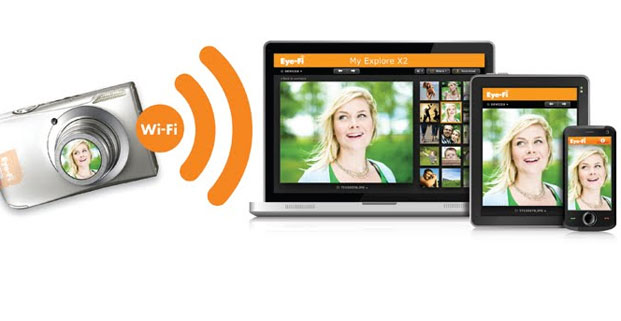
I've used Eye-Fi cards for a few years now and have been blown away by their functionality and feature set. I remember an article I read about this device from Walt Mossberg back in 2008. I am also shocked at how many people do not have nor have even heard about this wonderful product.

What is geotagging? With the built-in gps within the Eye-Fi card, all your photos are labeled with location data about where the picture was taken. Applications like iPhoto, Photoshop Elements, Picasa and online sites like Flickr and SmugMug all recognize this information and can show you where all your pictures were taken. Great for finding a picture from your last vacation.

Obviously you have wi-fi at home...right? Well if you get the Pro X2 or upgrade one of the other cards with Eye-Fi's hotspot access, you'll be able to upload your photos from the tens of thousands of AT&T wi-fi hotspots across the US. You can find these hotspots at Starbucks, hotels, Barnes & Nobles (if there are any left open near you), airports, etc. Great for when you are on the go and want to make sure your pictures are safely backed up or shared. (Note: the hotspot service is only free for the first year.)

If it sounds like this is an ad...it isn't. I just love this clever, little device and feel is it not getting the recognition it deserves. Out of my dozens of "tech geek/photo-freak" friends, only one has this amazing device. And for as little as $40, you get a 4GB memory card with all these features. So if you are in the market for a fast SD memory card...go get yourself one of these and let me know what you think.

My only gripe is that there is not a compact flash version for my Pro cameras that don't use SD cards.


Also be sure to comment below and share your experiences with any of these devices in general. You can also follow me on Twitter or Facebook.

If you have any comments or feedback, feel free to email me at wouldntmind@gmail.com.

Just my 2-cents,
Larry