Showing posts with label IPhone. Show all posts

The be-all, end-all Holiday Gift Guide for 2012

On Monday, December 3, 2012 0 comments


This is turning out to be a pretty exciting year for great holiday gift options! Movies, games, products as well as a slew of trusted "relatively new" tech to keep everyone happy.

I really would appreciate it if you would "share, like, tweet, pin, post or follow" me. Please spread the word so I know there are people out there that are listening :-)


I have endeavored to put together a series of posts over the past month that highlight tons of great gift ideas. I certainly hope you found something to elicit joy and excitement for the recipient! I know I would be happy if I was on the receiving end of one of these!

Be sure to check out these posts for any gift ideas for friends, family...or something for yourself.


and


I hope these help! Once again, please "share, like or follow" for more great product information especially with the Consumer Electronic Show (CES) coming up next month.

Please follow me @


Happy Holidays,
Larry


LarryLarry Pacey, award-winning designer tracks the latest news on consumer products, electronics, appliances, smart devices, networking and the gadget lifestyle.For the latest news follow me on:

------------------------------ OR -------------------------------


Please comment below and share your thoughts. If you have any feedback or questions, feel free to email me at wouldntmind@gmail.com.

Just my 2-cents,
Larry

Healthy Holiday Gifts 2012

On Friday, November 30, 2012 1 comments

I can tell you that I look towards the holiday with trepidation. I have been slowly chipping away the pounds throughout the year and am now looking down the barrel of some great "eating" opportunities.

I have my favorite side dishes for Thanksgiving and know some great breakfast spots that I like to hit over that long weekend. And then we enter the end of the year celebrations with Christmas and New Years. Again, there is tons of great snacking opportunities and big dinners with friends and family!

Did I mention that I love food?

So I will need every tool I can muster to help fight these pounds from building up. Sure, I will try to eat in moderation but lets look at some great tools and potential gift ideas for friends and family to help encourage a healthy lifestyle.

Probably my favorite tool for keeping me focused is my trusty Fitbit. And the crew at Fitbit has introduced a new version called the Fitbit One ($99). This device is a little thing you clip onto your belt or pocket and it monitors your activity level throughout the day. It will measure the number of steps, calories burned, distance traveled and the number of flights of stairs you climb. If you wear it at night, it will tell you number of hours you slept and will even measure the quality of your sleep.

The original version required you to dock to your computer to charge and transfer your data to Fitbit.com's data tracking site. This new version accomplishes this wirelessly and can even talk directly to your Bluetooth 4.0 enable device like the latest iPhone and iPads.

I really find this device is a motivator that helps you keep yourself active. But if you need extra encouragement, you can share and compete with your friends on your progress.

The Fitbit One has just begun shipping as I write this. You can order it on Amazon.

While I am talking about FitBit, they have also introduced their new Aria Smart WiFi body weight scale that can track your weight, body mass index (BMI) and percent of body fat. The scale allows you to track trends, set weight goals, earn badges online or via your smarthphone.

The Aria automatically recognizes up to 8 users and interfaces with the above mentioned FitBit.com website. The site can also help you log food, workouts and set weight goals with daily calorie planning.

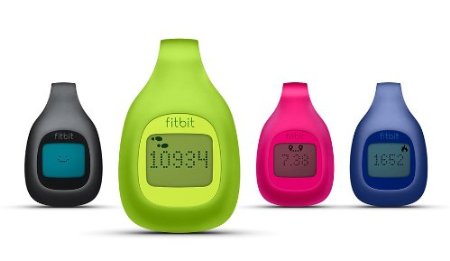
Fitbit has also released a lower-cost version called the Fitbit Zip that comes in five fun colors and relies on a replaceable coin-type battery for $59.

There are other products in the category that track your activity that you could checkout such as the Nike Fuel Band and Jawbone UP (2.0) but neither of these have knocked my socks off from the quality of execution between the hardware features and software.

Some other great fitness product recommendations:

Polar FT Fitness Watch

Fitness Videogames
Dance Videogames

LarryLarry Pacey, award-winning designer tracks the latest news on consumer products, electronics, appliances, smart devices, networking and the gadget lifestyle.For the latest news follow me on:

------------------------------ OR -------------------------------


Please comment below and share your thoughts. If you have any feedback or questions, feel free to email me at wouldntmind@gmail.com.

Just my 2-cents,
Larry


Enhanced by Zemanta

Canon ups their game for 2012...

On Thursday, April 26, 2012 0 comments

This is the hot season for new camera introductions to be entering the market and 2012 is shaping up to be one of the hottest years in camera technologies in quite some time. The fact is that camera makers are having a bit of a hard time. There is no question that more and more people are taking pictures with their smart-phones and some of the latest camera phones take some impressive pictures, especially in well lit environments.

Just check out some unretouched pictures from Apple's latest iPhone 4s!


So the camera manufacturers are creating additional value propositions as consumers move up the scale beyond standard point-n-shot cameras. And I recently wrote a note about Nikon's big 2012 line-up and I see the same level of intensity coming from other manufacturers...especially Canon and Panasonic.

Let's look at some of the hotness recently released from Canon...

Canon PowerShot S100
Canon started out late last year with the introduction of the successor to the popular S90/S95 compact performance cameras. This camera features a high-end array of features including an all-new 12.1 megapixel image sensor, bright F2.0 lens and powerful new image processing technology that is a substantial upgrade from their previous models. You've heard me rave about the S95 and this S100 (I have both)...and I have to say that the latest S100 is a great camera, it is a marvel of small size and very good image quality especially when taking nice, bright pictures in the shorter zoom range (1x-3x). This lens lets in a lot of light for a camera so small and allows you to take many indoor photos even without a flash. The addition of a slightly wider-angle (24mm) is a nice boon but increasing the zoom to 5x did introduce some compromises on the the brightness on the latter end of the telephoto range. I wouldn't use this new level of zoom unless you are outdoors on a nice sunny day or well illuminated environment.

Another popular use for this camera at our household is as our "go to" video recorder. And the new S100 adds the ability to quietly zoom while recordings which is a very nice addition. We find that 80-90 percent of our family video shoots, we use this camera over pulling out a full camcorder. The S100 introduced full 1080p video resolution versus our old S95 at 720p.

Sadly, the battery life has gone backwards on the S100 from the S95 which is a bit of a shame. But I still highly recommend this camera, it really satisfies the "you can only take a picture, if you have a camera" and the S100's size is truly pocketable. The images can frequently be confused for pictures from my higher-end digital SLR cameras. This is something I carry around with me all the time. And most of the pictures I share with friends and family come from this camera.

If you have the S95, it is really not enough of an upgrade to justify the move. The update includes a longer 5x zoom starting with a respectably wide 24mm and going all the way up to 120mm, GPS and 1080p video capture with zoom. If you don't have a quality, easy to use and pocketable camera...this is the one for you.

Canon PowerShot G1X
In an effort to fill the void between "point and shoot" and "digital SLR" cameras, Canon is taking the approach of a compact, all-in-one design (camera body and integrated lens) where you get an all-new 1.5 inch 14 megapixel image sensor that is substantially larger than your traditional compact cameras (approaching Digital SLR size) and an integrated 28mm wide angle / 4x zoom lens allows this camera to be a good compliment to someone looking for a second camera to support their larger DSLR camera.

Sample from Canon G1X
I've played with this camera a far bit and have mixed feelings about this new, first-generation offering. Canon is taking a different tack versus their competitors that are offering small, professional-styled compacts with interchangeable lens. Canon integrated the lens and while this adds a lot of convenience in a compact form factor, I also believe this is giving the camera some serious weaknesses. The first thing you will notice is that focusing is not as fast and crisp as some of the competitor offerings. Where this camera shines though is in its large sensor that captures light more cleanly thus affording some very impressive low-light pictures and bright, clean pictures overall. See sample to the right.

I'd say this camera feels a bit first generation and has huge potential to improve over the years. For now I would lean toward the Canon S100 which is MUCH more pocketable if you want a small, secondary camera that offers a decent amount of control. Or if you looking for more of a step up than the S100 offers, I would recommend the Canon G12.

Canon 5D Mark III
Now we are really leaping into the upper regions of the Canon camera universe with the newly introduced 5D Mark III. This is a semi or professional digital SLR (DSLR) camera that offers an impressive 22 megapixel full-frame sensor. This is a very large sensor, most sensors in the consumer DSLR realm are "cropped" and only have a fraction of the size of a full-frame (same image sensor real estate equivalent to a 35mm film photograph).

Though it looks quite similar to the Canon 5D Mark II (note: this is my current "go-to" camera), the 5DM3 is an all-new design on the inside and really leverages some innovations in the Canon crop sensor space from the hugely successful Canon 7D. But this new camera one ups almost ever aspect of the previous Canons before it. The new 5DM3 leverages the 61 point Auto-Focus system from the top-end Canon 1DX and offers a huge ISO range of 100-25,600 to allow for some impressive low-light and high-speed photography.


At the core is a new Canon Digic 5+ processor which adds much needed horsepower to a camera handling large images. You will also find support for UDMA 7 Compact Flash cards as well as dual memory card slots accommodating Compact Flash and SDXC cards.

It is really hard to compare the 5DM3 versus the 5DM2. While they look almost identical except for a few tweaks here and there. The insides are completely different and really have evolved based on the needs and feedback of professionals to provide a fast and adaptable camera. The old 5DM2 was focused on megapixels and image clarity that proved a great landscape camera but the older camera was a bit slow on its focus. This new camera is notably more accurate and faster.

While I will go into a more in-depth review in the near future, suffice it to say, I am impressed with this new camera and it is right in my wheelhouse of features and capabilities. But I am a bit torn between the Canon and its direct competitor...the new Nikon D800. I do tend to prefer the color gamut of the Canon over the Nikon's almost surgical imagery.

My personal camera shopping dilema...

Typically I like to "make a recommendation" on this blog. I tend to point out my personal preferences and point out why I feel that way. But on this last category of product, I just haven't pulled the trigger on either yet as I need to spend a bit more time with both the Canon 5DM3 and the Nikon D800 before deciding.

Regarding price, the Canon 5DM3 and all it's horsepower comes at a price...$3,499 for just the body vs the original 5DM2s $2,699! There is no question, the 5DM3 is a much needed upgrade. I would love the improved speed, some notable improvements in some photographic technicals like how it handles color-fringe correction, metering and it's advanced focus system. And if you are vested in Canon lens...this is a great update and highly recommended. But I have both Canon and Nikon gear and from a pricing standpoint, the Nikon D800 is priced at $2,999 for the body and comes with an impressive 36 megapixel sensory plus all the other updates mentioned in my previous Nikon 2012 write-up. And my 5DM2 is still a solid performer. Hmmmm????

If you have some questions or thoughts about this, please comment.

More to come...


LarryLarry Pacey, award-winning designer tracks the latest news on consumer products, electronics, appliances, smart devices, networking and the gadget lifestyle.For the latest news follow me on:

------------------------------ OR -------------------------------


Please comment below and share your thoughts. If you have any feedback or questions, feel free to email me at wouldntmind@gmail.com.

Just my 2-cents,
Larry

Apple Showcases OSX Mountain Lion

On Thursday, February 16, 2012 0 comments

This morning Apple announced this summer's release of the Macintosh operating system...correction...they dropped the "Macintosh" in front of OS X! If you really look closely, this list of features are clearly inspired from efforts already well developed on the iOS based products like the iPhone and iPad.

Let's look at the new capabilities announced so far...

Messages
The messaging client from your iPhone or iPad is now available for your Macintosh desktop and laptops. It provides a convient way to send unlimited messages to Macs, iPads, iPhone and iPod Touch's. You messages are synced across devices allowing you to maintain your conversation across your personal devices. Start the chat on your Mac and keep on chatting with your iPhone as you walk out of the house.

Messages include support for photos, videos, file attachments, your contacts as well as your location. And if you really need to take this conversation to another level...you can launch directly into FaceTime and hold a video call. These messages are not limited to iMessage but also supports other chat systems including AIM, Yahoo!, Google Talk and Jabber accounts...this way you can bring in all your friends.

The good news is that you can download the beta of Messages for your Mac today!

Reminders
Another popular app I rely a great deal on my iPhone and iPad is Reminders. A very nice feature is the ability to not only the ability to maintain multiple lists of reminders/tasks but also the ability to set a due date OR even better an alert when you are at the location of the reminder. Say you want to be reminded to pick up some groceries. Make the list and put your grocery store location into the list. Then as you arrive, the list pops up on your iDevice! Very convenient...especially for an absent minded person like me ;-)

Now I can put items on my lists on all my Apple devices and they are synced together. Another great capability sewn together by Apple and their range of computing devices.

Notes
Okay...by now you are starting to see where this is going, right? Make sure all your iDevice apps are able to be synced with your Macintosh. And while that isn't earth-shattering, it does solve a technical divide for those of us with iOS products and Macintosh computers. So Notes is right there. Now you can put together notes with text, pictures and the like and sync it across your devices.

Some unique aspects on the Macintosh is the ability to "Share" your notes with friends via Messages or Mail. You can also pin your notes to your desktop for easy access. And of course, your notes are synced, so they reside on all your devices.

Notification Center
I know a lot of people that don't even know that their iOS device has this feature. When your phone or tablet is on, simply swipe your finger from the top of the screen downward and this info section will slide down and highlight all your notifications from multiple apps.

Well, now those notifications will be available on your Macintosh, you just swipe from the left. This will highlight conversations from the Messages application, your latest Mail, Calendar alerts and other application information.

Share Sheets
Safari and other applications will now feature a greater range of options to share information as you run into noteworthy items. The usual stuff is there like posting pix to Flickr, videos to Vimeo and Twitter integration. You see it...you can share it.

Twitter
Tight Twitter integration affords you the ability to Tweet from anywhere. And get notifications of tweets about you no matter what application you are currently running.

Game Center
Again, now that the Mac has its own App Store and games can be easily downloaded like an app on your iPhone. Now you can keep track of all your gaming activities and rankings via Apple's Game Center.

Not only does this track your progress but it also makes it easy to find friends and play multiplayer games.

AirPlay Mirroring
I don't know about you but I have frequently wanted an easy, wireless way to get my content on the Macintosh onto my TV. Well, Apple has made it a bit simpler if you are into the whole Apple eco-system of platforms. AirPlay is the ability to stream content from your computing devices to an AppleTV device hooked up to your television. Now the Macintosh joins the fray with AirPlay Mirroring support. Stream movies, presentations, surf the web and other applications via this new AirPlay functionality and a nice HD television.

Gatekeeper
A new service to help protect your computer from malware you may download to run on your computer. It seems to really monitor new installs and make sure you know where they are coming from. One solution the application provides is the ability to control/limit where you download an application from. You can set your computer to only accept programs from Apple's Mac App Store. Or you can extend it to support applications from Apple's "known developers". And lastly, you can download from anywhere "at your own risk"!

iCloud
Obviously a lot of the aforementioned functionality comes to your computer through Mountain Lion's tight integration with Apple's iCloud services. This cloud technology quietly syncs all your information into Apple's internet storage and transmits it to all your authorized devices so that you have one set of information...consistent across all your Apple products.

Conclusion
None of these new application features really standout as must-haves and it really seems to be a bit of a yawn. While I am an avid iPhone, iPad and Mac user...I have solutions for most of this functionality today.

First of all, I can download the beta of Messages. I rely on Evernote for syncing my notes across all my devices and the application is also available for PC and most web browsers. There is a Macintosh application called AirParrot that provides AirPlay functionality on the Macintosh. I do use Notes on my iPhone and iPad for their location based reminders and can live without Mac support or could move to one of the dozens of great reminder apps available for Mac, PC, browsers, Android and iOS devices.

The tighter integration of iCloud throughout the OS is probably the most promising functionality to be leveraged. More on this as I have time to work with the early developer release.

So as it stands, I am not sold on this offering. It really feels like some of those old Microsoft updates where they just took ideas from other company's applications and integrated into their OS. Apple may have some other tricks up its sleeve as we get closer to the late summer rollout date. I certainly hope so.

You can see Apple's video highlighting these new features below...


LarryLarry Pacey, award-winning designer tracks the latest news on consumer products, electronics, appliances, smart devices, networking and the gadget lifestyle.
For the latest news follow me on:

------------------------------ OR -------------------------------


Please comment below and share your thoughts. If you have any feedback or questions, feel free to email me at wouldntmind@gmail.com.

Just my 2-cents,
Larry

What can you do with that new iPad/iPhone?

On Tuesday, December 27, 2011 0 comments

I am regularly asked what are the best apps for the iPhone? What can you do with an iPad? And with these devices being some of the most sought after holiday gifts, there are probably quite a few new iDevice owners out there. So here is my list of great apps and accessories for the iPad and other iOS products.

How do you make your iPad more productive?

Keynote - Is Apple's presentation app for iPhone and iPad's that includes twelve template designs, animated charts and twenty smooth transitions. There is an adapter for your iOS device that will allow you to output to a monitor or projector or you can stream your presentation via AirPlay to a television equipped with an AppleTV. The app also supports presentations created in Apple's desktop version and Microsoft's PowerPoint. Overall I don't make presentations on my iPad but find it very useful in giving my presentation via the iPad. The iPad will show your presenter notes and even offers a laserpointer functionality.

Numbers - Apple's spreadsheet app works on all iOS devices as you'd expect though I have experiences some challenges with compatibility and syncing with Apple's iCloud storage solution. I mostly use this app for some quick tabulation of numbers and to pop open the occasional Excel file. If you frequently receive or want to edit a smaller worksheet this app is nice to have in your arsenal. But it may not be the first app you need to get.

Pages - This is another Apple application and probably one of the more frequently used by me to create and edit word processing documents. The application is pretty full featured and works well on all iOS devices. It is compatible Microsoft Word documents, Apple desktop Pages documents as well as plain text files. A great addition for iPhone 4S users is the new dictation feature that provides the ability transcribe your words into text.


Quickoffice Pro  - While I am in this neck of the woods if you are looking for an app to really focus on reading and editing Microsoft Office documents, look no further than Quickoffice Pro. This is the Swiss Army knife to review your Word, Excel and Powerpoint files. Not only can you edit and navigate even large files with ease, the app natively syncs and shares your documents on cloud services like Dropbox, Google Docs, Box.net, Huddle, SugarSync and Evernote.

Awesome Note - This app combines notes and to-do's into a single application. It is a great little bucket to fill up all aspects of your life. You can create color-coded folders for different topics and create multiple notes in each folder. Notes can include pictures, text, hand-drawn images as well as reminders and alarms to keep you up to date. I find this as a great tool to track my projects and longer-term needs. You can sync your notes with Google Docs or Evernote (more on that later).

How do you stay informed?

Pulse - This beautiful application transform all your streams of news, websites and social networks into a mosaic of sliding images and text that truly reinvents how you gather and read your news. You can sync content from Facebook, Twitter, Google Reader as well as document reading services like Instapaper, Read it Later and Evernote. The application also supports off-line reading with your news cached on your smart-device.

Flipboard - The best way to describe this app is as your social media digital magazine. Like Pulse, it aggregates information from a wide-range of sources and transforms the information into a magazine format that makes surfing through the content extremely enjoyable.

Facebook - Sure, you can access Facebook on the browser of your mobile device but the native app can navigate the sites wide-range of features. The recently released version is extremely intuitive and makes accessing your wall, photos or sending a message with ease.

Twitter - If you are a twitter-holic or just want to keep your eye on your stream of "follows", this is a good clean app for this service.


Shazam Encore - This app almost magically samples a song playing anywhere you hear it and figures out the song and artist! You have to see it to believe it. And new features include the ability to sample some commercials or TV shows to get access to additional information or promotions.


How do you get your life in order?

Evernote - This note-taking app will consume and store pretty much anything you give it. And not only can you retrieve or edit your content on the iPad but the information is available on your smart-phone, computer or nearly any web-browser. I have sections for my ideas, clippings from the web, pictures of things I run into and want to remember. Text, audio, images all stored conveniently online and easily searchable.
Dropbox - Is another great application for synchronizing your files and data across multiple devices. This really opens up the doors for how much information you can take with you as the largest storage you can buy on an iPad is 64 gigabytes. And images, movies and audio files can fill that up quickly. Another great feature is the ability to share specific files or folders with family or friends for easy transfers or collaboration projects.

CardStar - Take all those loyalty cards you collect out of your wallet or purse and make them digital. Receive coupons and local deals automatically.

Reminder - This app is already installed if you have iOS5 the latest version of the iPhone and iPad. This little gem has a very special feature that allows you to place reminders and tasks that not only trigger based on a specific time but also based on a set location like home, work or a specific destination. Now you can get prompted with your shopping list as you walk into your local grocery store!

How does the iPad help me watch my money?

Pageonce: Money & Bills - An great aggregator of all your financial and personal information. Their system links to all your financial (credit cards, banks, 401K) and point accural/loyalty systems (Hertz, Starwoods, Hyatt) to keep track of investments, rewards and bills.


How do you unlock your inner creativity?

Instagram - Take great pictures on your iPad or iPhone, add a filter to spice up the look and share it to Facebook, Twitter or Flickr...all in this one app and online service.

Snapseed - An amazing photo-editor that is fun, easy to use and extremely powerful. You want adjust image settings, work on just a part of the photo and add cool filters.

GarageBand - This is a fun and entertaining music creation tool for the experienced and novice. You will be surprised at what you can create  with this multiple track and multiple instrument audio tool and be sure to share your songs with friends and family.


How does the iPad keep me entertained?

Netflix - Take your Netflix's movies and TV shows on the go. Of course your choices of available content with your Netflix streaming subscription seems to be shrinking of late but let's hope Netflix is able to get additional studio content in their digital subscription.

HBO Go - Stream all the HBO exclusive content on your iPad. It is a free additional service for HBO subscribers. It is a great way to stay up-to-date on the latest movies, HBO originals like Boardwalk Empire, Curb Your Enthusiasm, etc.

Pandora Radio - Take internet radio with you. Be surprised, discover new artists and songs. You can create your own channels of songs based on your preferences in music!

Spotify - Is a subscription music service that allows you access to millions of songs. But to really leverage the platform on our mobile device you need to look at some of their subscriptions options. Check out what they offer and if you are a music buff, you may really want this one on your iPhone or iPad.

iBook - This app is free and available for pretty much all the latest iDevices and is Apple's solution for ebooks, magazines and even stores your PDFs for later reading. Overall Apple has a great library of books and compatible magazines with some exclusive that require me to use this app but I do seem to lean on the next two apps a bit more.

Zinio - Is a magazine/periodicals solution on the web that allows you to subscribe or purchase single issues. The range of content is pretty good and the ability to access your content on a wide range of devices makes it a step above the Apple iBook solutions for the most part.

Kindle - I'm sure you have heard of the Kindle ebook reader sold by Amazon but you may not know that you can access those same books on your iOS device like the iPad or iPhone.

DirecTV - Access the content on your internet-connected DVR, watch live television, program or control your DVR and research show information all from this app. A must for any DirecTV subscriber. Comcast has a digital solution as well but I am not familiar with their solutions. Other providers probably do as well and you should look up what yours has to offer.


How do you have fun with the iPhone or iPad?

Angry Birds - There are several versions. Start with the free traditional "Angry Birds" and work your way up through the "Seasons" and other versions. There is a reason this is one of the hottest smart-device games on the planet.

Infinity Blade and Infinity Blade 2 are cinematic combat games. You control how your character attacks based on how you swipe your finger on the screen. It is a pretty rewarding action game that offers some of the most visually stunning imagery available on a tablet or smartphone.

Words with Friends - Okay, I am just going to say it. It is Scrabble! Sure the board is a bit different but it is essentially Scrabble. You get tiles of letters and build words on each others words. What is cool about this is that you can play your turn and send it to your friends smart-device where they will play their turn when they get a free moment. This allows you to have a whole slew of these games running in parallel. Just don't try the Scrabble/Words with Friends cheat sites!

Zen Bound 2 - Using just your finger, wrap up unusually shaped objects with twine. The quest for more efficient wrapping will keep you busy for hours.

Tiny Wings - It couldn't be simpler. You touch the screen when you want your bird to dive to the ground. If you time it right, the bird will hit the downslope hard and zoom up the hills and get airborne...repeat before the day runs out.

Where's my water? - Who knew it would be so tough to get the pumping just right and get that water to the bath tub! Lots of fun! A beautiful Disney production.

Osmos - Save your little blob by absorbing the smaller objects and avoiding the bigger ones before they absorb you! Physics fun!

Flight Control - You are in charge. You have to get all those planes to the right runways without colliding with each other. Very fun and multiplayer is even more entertaining.

Tiny Tower - You are the landlord. Start with only one floor and build your empire one floor and one bitizen at a time. Probably my favorite game of 2011 on the iPhone. You play it when you have time and can check in on the game in a matter of moments.

Contre Jour - Another great navigate your blob around the screen. This game requires you to modify the surroundings to complete the level.

Cut the Rope - With a finger swipe you "Cut the Rope" and the trick is to feed your candy to the little green guy. The levels are fun and can prove challenging but highly recommend this game.

Jetpack Joyride - A great combination of racing through a level, seeing how far you can get with loads of customizations while trying to accomplish a well balanced set of unique goals with each run through the level. My favorite action game of the year on any smart-device!

Plants VS Zombies - If for some reason you haven't played this on any device...get this! You build up your defenses from a continuous onslaught of the undead!

Fruit Ninja - Chop the fruit as it comes flying on the screen. It can be very rewarding. Just avoid the bombs. Multiplayer is great fun as well.


How do you keep your kids entertained and educated?

Mathemagics: Mental Math Tricks - Anyone can benefit from keeping your mind agile by testing out your mental math skills.

>Sudoku - Is Sudoku plus a points system, runs and a leaderboard. Probably the nicest execution of Sudoku and it is FREE.

Star Walk - Point your iOS device at the sky and the app will tell you what you are looking at. Stars, constellations and even satellites all show up in real-time. This is a beautifully produced application for stargazing.

The Elements - Is an incredible recreation of the periodic tablet. Highly interactive and engaging. You will learn something new every time you open this app up.

Flashcards Deluxe - Make your own flashcards or download study sets online. Smart study system automatically focuses on cards you miss. Supports Quizlet.com and FlashcardExchange.com for 4 million+ flashcard sets.


How does an iDevice get you around?

Navigon - GPS app for your iDevice. You have Google Maps already on your device but this turns your phone or tablet into a real-time navigation system with turn notices, traffic and route finding. Worth the money!

Yelp - Brings the popular online site for crowd-sourcing/reviews of your local establishments. Helps you find "lunch", "dinner", "mexican" or any other venue nearby.

Opentable - This is a wonderful system that allows you to make reservations on your phone or tablet at your favorite local restaurants. The app includes reviews, menus and helps secure your reservation while you are on the move. You also earn points with each reservation that can be redeemed for credit that can be used at any Opentable compatible restaurant. I pretty much decide where we are going to eat nowadays based on where we can get a reservation.

Pageonce Trip Tracker - Made by the same people that make the Money and Bill's app above. This is a great app to get real-time flight status, itinerary push alerts, live weather, route maps, hotel information and car rental details...basically helps with all your travel needs.


How does the iPad keep you cooking?

Epicurious Recipes - From Epicurious.com search more than 30,000 delicious, professionally created recipes from Bon Appetit, Gourmet, Self, and renowned chefs and cookbooks.


Can the iPad help me shed pounds?

Fitness - Features 700+ exercises for men and women and 50 YOGA poses with video and audio instructions. App includes 700 videos and 40 ready-made workouts.


While this article has focused on what is available for the most sought after computing devices of the past couple years...the iPhone and more specifically, the iPad. It doesn't mean that the app isn't also available for Android smart-phones, Blackberry or even the Windows Phone and all are probably great apps no matter what platform you have. I just hope this is a good starting place for someone interested in getting the most out of their smart-device.

I'll endeavor to keep this list fresh and up-to-date as new and better apps come about or some of these get outdated. I would LOVE to hear about your favorite apps...comment below!

Enjoy your mobile computing experience and wishing you a Happy and Healthy 2012!


For additional details, check out my 2012 Consumer Product Trends, some additional summaries like this one for other product categories at WouldntMind.com and specific key product details coming out of CES 2012 at WouldntMind.com News Page.

LarryLarry Pacey, award-winning designer tracks the latest news on consumer products, electronics, appliances, smart devices, networking and the gadget lifestyle.
For the latest news follow me on:


------------------------------ OR -------------------------------


Please comment below and share your thoughts. If you have any feedback or questions, feel free to email me at wouldntmind@gmail.com.

Just my 2-cents,
Larry