Blurring the lines between a laptop and a tablet

On Tuesday, January 31, 2012 0 comments


I love my iPad. I still have the original iPad. You can read my logic on not upgrading to the iPad 2 in my piece last August..."No idea why someone would buy any tablet other than an iPad". And that argument holds true for a couple more months until the iPad 3 is introduced. But that is not what we are going to talk about here.

While I love the iPad for surfing on the couch, in bed, on a plane, at the beach and the like. BUT I still need a full operating system, keyboard and the like most of the time. I am writing this very piece on my second "computing love"...the Macbook Air. I have the 13-inch version, there is also an 11-inch version that I was really tempted to get for its shear small size/portability but ultimately decided I would like a slightly larger and higher resolution screen to afford me the ability to have a couple windows open at the same time...the prime reason for a laptop versus a tablet for me. That ability to easily navigate multiple applications at the same time is invaluable. There are many occasions where I want two (or more) windows open and viewable side by side. On the 13 inch screen I find the Air's 1440 x 900 resolution to be a great alignment of size and pixel density. Sure more resolution would be nice but overall this is a great minimum spec. But lets back up a bit...

Apple Macbook Air
After I ordered this latest Air a few months ago, I really started to have buyers remorse. I was scared that while the reviews and my own experiences at the Apple store indicated that the new processing power in the Macbook Air would have enough juice for my somewhat hefty needs...I was still concerned that such a small computer would not meet my power needs. While waiting the couple weeks for my Air to arrive, I was looking at the other Macbook and even PC options with more horsepower/ memory and was starting to sweat my potentially bad decision. You see the Macbook Air is physically limited to 4 gigabytes of RAM and a dual-core processor instead of the quad-core found in most newer Macbook Pro's.

I would say I push a laptop pretty hard. I run quite a few programs concurrently. It is not unusual for me to have a few Microsoft Office applications (Word, Powerpoint and Excel) all going. Adobe's Photoshop and/or Apple's Aperture photo management software. And during a work day, I will have VMWare's Fusion virtualization application that allows me to run Microsoft Windows 7 and some work PC applications.

Well, I am happy to report as I earlier proclaimed my affection for this very sleek laptop which seems to handle everything I throw at it. It runs like a champ. I couldn't be happier. Slim, lightweight, instant on and all around great product to take it with me no matter where I go.

Others must be having similar experiences because nearly all the PC manufacturers at this year's Consumer Electronics Show (CES) were all about this form-factor being called an Ultrabook. Now Ultrabook is a branding initiative by Intel to generate a lot of buzz about a product offering that falls between a tablet and a laptop. Truth be told, the Macbook Air and these Ultrabooks for the most part are slimmed down laptops with a new generation of capabilities, power conserving mobile computing processors and for the most part fast, instant-on solid state hard drives (SSD). DVD drives and the like are getting replaced with SD memory slots and online connectivity.

There is also the belief that as software evolves we will begin to see a truly new category of hybrid computing devices. But for now, I am happy to get a powerful computing device into smaller configurations.

There is also a realm of tablets trying to transform themselves into near PC functionality when you attach a keyboard but currently their roots get in the way and you end up with just a tablet and a keyboard. The experience didn't evolve beyond the basics of the tablet's operating system whereas these Ultrabooks may provide PC consumers with the benefits similar to the Macbook Air...sharing and manipulating data across multiple applications.

Well I don't want to get too techie or geeky here so let's look at the products coming down the pipeline that show real promise to give you the Ultrabook portability from the PC/Intel teams...

This year HP really hit it out of the park with the design of the new Envy 14 Spectre. You have to see this thing to really appreciate the beauty of its design. It is a slick execution of glass inside and out that creates a very unique black glossy 13.3 inch chassis which HP indicated makes this premium Ultrabook more rugged and scratch resistant. Included is a 14 inch (1600 x 900 resolution) diagonal LED display, Intel i5 or i7 CPU and an upgrade option of an solid state disk (SSD) drive. All this does make the 20mm Envy a bit thicker than its Ultrabook peers and a fair bit heavier at just under 4 lbs. Form over function? You should also be warned that all this finery comes at a price...starting at $1,400! That is more than a similarly equipped Macbook Air which Apple tends to be the premium price leader.

On the opposite extreme, the Acer Aspire S5 is an amazingly shocking pieces of hardware that currently is one of if not the thinnest Ultrabook. Measuring only 15 mm at it's thickest point, weighing less than 3 pounds and featuring a 13.3 inch display is quite an overall feat of computing engineering. I guess squeezing a computer down to that size does cause some compromises along the way like a monitor resolution of only 1366 x 768 which is not anything to write home about nowadays even with a 13 inch display. That said, this very small computer does come with a nice complement of capabilities  including an SSD storage drive featuring an Instant On capability that takes the computer from sleep to on in 1.5 seconds and a host of connection options such as HDMI, USB 3.0 and a 10 Gbps Thunderbolt port. The packing is quite smart looking all wrapped up in an attractive onyx black magnesium-aluminum alloy cover. Look for Acer to start shipping the S5 in the spring.

Not to be left out of the mix, Dell's XPS 13 Ultrabook is a very nice piece of hardware measuring 18mm at its thickest point all the way down to only 6mm on one edge! The 13 inch diagonal display is compacted into this small 12" laptop. The Ultrabook has a nice quality feel to it consistent with most Dell computers and is made from carbon fiber and aluminum. These construction components help lighten the load and results in the XPS 13 weighing only 2.99 lbs. Consistent with other Dell computers, you will be able to configure yours with a range of options including memory, the choice of Intel's i5 or i7 processors and either a 128 or 256 gigabyte solid state hard drives. The 13.3 inch display is bright and clear but it too is limited to the 1366 x 768 resolution. Other than resolution and a limited array of connection ports, this is the most excited I have been about a Dell in quite some time and am looking forward to spending some more time with one as it comes to market next month.


Lenovo recently showed off some near-term consumer and business Ultrabooks but the most exciting product a very exciting Windows 8  laptop/tablet hybrid to be released later this year product. Not officially an Ultrabook, the Lenovo Yoga is a 17mm thin device that can be used as a laptop, tablet or flipped over as a kick-stand for watching movies. The display is a gorgeous 1600 x 900 LCD IPS with multitouch interface which is something not found on these other Ultrabooks. All this functionality for a retail price of $1,199 and available the latter part of this year.

Conclusion
All of these are very promising computing platforms for the person on the go but wants a full operating system PC. Each serves a wide-range of uses giving you a great selection of personalization options to compare to suit your specific needs. And based on my time with them over the three days of CES 2012, I believe they are all worthy new entrants into the marketplace.

If you need to pick-up a lightweight laptop today, I'd probably lean toward the Dell XPS 13 Ultrabook. It is a quality piece of equipment, offers a great range of configuration options in a very small and light form factor.

If you can wait until the latter part of the year, I am expecting a great deal of innovation to come forth as Windows 8 rolls out. I see Windows 8 as a game-changer and current PC designs will change a fair amount to take advantage of the new operating systems capabilities. Though Microsoft was incredibly quiet about a release date for Windows 8...the stars seem to be lining up for a late fall (October'ish) release.

I'll keep you posted as these and other mobile computing products come to market throughout the year.


LarryLarry Pacey, award-winning designer tracks the latest news on consumer products, electronics, appliances, smart devices, networking and the gadget lifestyle.
For the latest news follow me on:

------------------------ OR -------------------------


Please comment below and share your thoughts. If you have any feedback or questions, feel free to email me at wouldntmind@gmail.com.
Just my 2-cents,
Larry

Enhanced by Zemanta

CES 2012: More tablets than you can shake a stick at...

On Thursday, January 12, 2012 0 comments

New Samsung Galaxy Note available on AT&T Wireless
Okay, first of all I have to say is I love the saying "shake a stick at" even though it sounds very violent. But I have to tell you, there are were so many tablets at the show I probably could have used a stick to ward off all the people hawking their tablet offerings. And many people showing a tablet really couldn't tell me why I should choose their tablet over an iPad on depth and breath of content, Kindle Fire on price, the range of form-factors by Samsung or the Asus Transformer Prime on pure horsepower and potentially it's docking keyboard.

I guess it is nice to have a range of competitive offerings to keep pricing in check but for the most part there were way too many companies with tablets. The good news I guess as some of these people fall out with each new wave of introductions, they will probably be selling their excess inventories at below cost and there could be an opportunity there?

But let's just dive into my primer on CES 2012 from the tablets front...

First of all, I am still sticking with my BUY AN IPAD position featured in my "No idea why someone would buy any tablet other than an iPad" article from back in August 2011 for those of you looking to get a great tablet for your couch or late-night web-surfing. My only caveat is that I am expecting a new version of the iPad to be released in the March/April 2012 timeframe and you should wait for that one if possible.

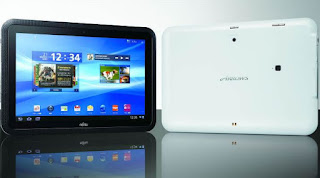
Fujitsu Arrows Tab gets credit for having one thing their competition didn't have. The tablet is waterproof! They even recommend for use in the kitchen or while in the bath tub! Okay, this is not a game-changer but at least they did something. Otherwise, it is a 10.1" dual-core Android, features a fingerprint sensor for easy unlocking and Dolby front-facing speakers. The CPU is definitely under-powered at 1ghz and the Android operating system seems to need more power than that for smooth, everyday operation.

The Lenovo IdeaTab S2 10" tablet was an attractive tablet offering that stood out from many of its competitors. It runs Google's latest edition of Android, has a very robust 1.5Ghz dual core processor and features the easiest to use keyboard dock solution we have seen, similar to the current marketing leading Asus Transformer Prime but seems to snap into place a bit smoother. The IdeaTab S2 is one of the lightest tablets on the market at 1.27 lbs and measures only 8.69mm thick. The keyboard doubles the devices battery life to nearly 20 hours as well as adds a USB and SD card reader port. Overall a nice tablet and offers a range of configurations including 3G and up to 64Gb of memory.

Samsung Galaxy Tab 7.7 LTE is an update to one of the original Google Android tablets. The name helps you understand this is of the 7" variety that kinda falls between the larger 9"/10" category and smartphones with their 4"-ish sizes. The new Tab 7.7 has three things going for it. 1) The display is one of Samsung's Super AMOLEDs which are absolutely gorgeous to behold. Bright and vibrant is underselling how this screen glows. 2) It comes with Verizon's 4G LTE connectivity which is fast. 3) The 7" form-factor is more convient for hauling around if that is important to you. The size can also be a liability if you are looking for that extra real estate that the 10" tablets can provide.

Toshiba Excite X10 gets points for quickly changing direction on some key aspects of their tablet offerings from last year. I won't go into detail but last year's model was a beast. Way too thick and heavy. The Excite goes to the complete opposite end of the spectrum where Toshiba claims to have delivered the thinnest and lightest 10" tablet. After holding pretty much every version of tablet on the planet over the past week, I'm going to agree the 1.2 lbs., .3mm thick tablet is bordering on almost too thin. It almost disappear when held to the side. It is also amazing that such a device also includes some of the most physical port connectivity of any tablet on the market today including a USB, a micro-HDMI and a SD card slot! All in all...a very nice package. The tablet is currently sporting last year's Android operating system but Toshiba is indicating they may ship as is and offer an upgrade later. The technology inside the Excite X10 is only a dual-core but it can accomodate Google's Ice Cream Sandwich.

Asus Transformer Prime TF700 was probably the technological tablet marvel of the show. The new version features a 1920x1080 resolution Super IPS+ display versus the 1280x800 resolution of the one that just started shipping. The enhanced resolution is expected to provide for much cleaner and crisper text and smoother visuals overall. Obviously the new stunning display combined with already the leading tablet solution on the market including the Nvidia Tegra quad-core processor for lots of processing power makes for an extremely attractive offering later this year. The rear cover has been reworked to address issues with wi-fi and GPS that proved to be a problem with the original. We are assuming the new version keeps or improves upon the existing 8 mega-pixel rear-facing camera and understand the front facing cameras is updated to a 2 mp version. The Prime also features a MicroSD slot and Micro HDMI output. Other details are less clear but we'll keep our eyes peeled for information as we get closer to its launch. Rumor has it launching within the next 6 months. There is a far bit on consternation from those that already just bought a device and less than 6 months later it is being obsoleted by a much nicer version.

Samsung Galaxy Note was probably my favorite tablet-ish device at the show. I say "tablet-ish" because the Note is of a new 5.3 inch format. Noticeably bigger than a smartphone, can be held in one "big" hand and can be put in a coat pocket and the like. Another great addition is the included "S Pen" which looks like a traditional stylus except is offers 256 degrees of pressure sensitivity allowing for a whole new level of interaction with your device. Ink on your notes or drawings on the screen can change based on the pressure you apply. Push harder and get a bolder, thicker like for highlighting text or for marking up your documents. The device does run an older operating system (Gingerbread/Android 2.3) but all-in-all this was a really different product and nice based on my initial interactions with the device. The device also features the eye-candy HD Super AMOLED display technology from Samsung and AT&T's 4G LTE connectivity.

Apple's iPad 2 was not at the show in official form but it was VERY well represented by halls full of accessories across all different consumer electronic categories. If you walked around at CES you would understand why I am still strongly advocating the iPad. I am talking about Apple's AirPlay compatible devices like speakers, AV receivers, routers and televisions linked up to an AppleTV. Docks, stands, portable chargers with Apple's connector and don't get me started on cases! Now I am still advising that you wait until the rumored iPad 3 gets announced in the coming in roughly the next 60-90 days. But the iOS eco-system of peripherals and apps dwarves the competition and is the only viable solution in the tablet marketplace today unless you have a very specific application or use that one of the other tablet solutions provides. An example is the unique size form-factor of the Samsung Galaxy Note or if you want to take a shower with your Fujitsu Arrows Tab.

I should mention that there is a slew of new Ultrabook (very small and lightweight) laptops that are leveraging the innovations in the shrinking of electronic components for tablets and smartphones into a laptop form-factor. I will cover laptops and their innovations in another piece but there is this category that starts blurring the full PC operating system based solutions with these tablets while tablets move the other way with keyboards and the like. Both platforms have unique advantages and you'll need to evaluate based on your needs which route to go but it does get tricky here in the middle. I'll do a piece in the near future trying to describe this blurring in better detail.

The Microsoft 8 tablets will be coming out later this year and show a fair bit of promise. I'm holding my judgement until I can have some more time to play with one for a while. I am intrigued by the Metro interface and if Microsoft can get the hardware and application support, it might start bridging the gap from tablet to PC. More on this as they get closer to launch.

One last tablet just an FYI...

One-Tablet-Per-Child is the One-Laptop-Per-Child organization's latest effort to develop solutions for economically challenged countries. This solar powered tablet for children is in development but looks very promising for helping to get educational and informational solutions to the farthest reaches of the globe. While still in development, the goal of this extremely worthwhile product effort is to make each tablet for around $100. Quite a worthy cause and great concept!

For additional details, check out my 2012 Consumer Product Trends, some additional summaries like this one for other product categories at WouldntMind.com and specific key product details coming out of CES 2012 at WouldntMind.com News Page.

LarryLarry Pacey, award-winning designer tracks the latest news on consumer products, electronics, appliances, smart devices, networking and the gadget lifestyle.
For the latest news follow me on:


------------------------------ OR -------------------------------


Please comment below and share your thoughts. If you have any feedback or questions, feel free to email me at wouldntmind@gmail.com.

Just my 2-cents,
Larry

CES 2012: OLED/LCD/IPS/4K Generate A Lot of Buzz this year

On Tuesday, January 10, 2012 0 comments

What am I talking about? After sitting through all the big television manufacturers presentations at CES 2012, it is clear that there is a war waging like never before to provide the best solution for watching X-Factor, NCIS or Modern Family. The television manufacturers are really focused on transforming the television into the computing hub of your home.

If I had to dish out a score card for how I believe the different television manufacturers are lined up to provide the best TELEVISION product offerings for 2012, I think it would go something like this...

Panasonic - For some reason I really just get the feeling they are "phoning it in" this year. Someone reading this at Panasonic is going "what the"? I mean they really had a large array of products on display but overall they just didn't evolve as much as others. If you saw the 2011/2012 product comparison demos...you would scratch you head as to the minutiae they were pointing out. Panasonic has a solid staple of incremental improvements in their plasma and LCD products. It is clear they have stuff cooking but this really seems like an off year for them. So much competitive progress in bezels and depth. This pains me to say as I have been a big fan of the plasmas for years but other technology looks to steal the plasma's thunder in the coming year or so. Their connected/internet apps offerings just seem a bit behind the times as well.

Sharp - About the same as Panasonic. Their new LCD televisions are the biggest sized options overall but they really don't seem to be competing on the connected feature offerings. Even though Sharp is pushing the envelop on size, I would challenge that without raising the resolution beyond 1080p...you can really start to notice the pixels. While the content for resolutions beyond 1080 are years off and Sharp plans to pursue these large sizes, they will need to address this "somehow". Bigger is not alway better. Now they did demo a 8K display which is 8,000 pixels wide that would blew you away with its detail and overall clarity (like looking out a window)...but there will be no content at that resolution readily available for another decade!

Vizio - I've been a big fan of how Vizio has really shaken up the television industry and has really driven features and value with some of the best televisions for the dollar out there. But this year it seems that Vizio's eyes have been on getting into new segments and the 2012 line-up just feels a bit underwhelming. More of the same. Still attractive product offerings overall but no advancements like some product offerings you are about to read about.


Sony - Really seems to be addressing their past challenges regarding software and user interface design especially with solutions like the new Google TV offerings. They also demonstrated some new active 3D glasses that are much more lightweight. Sony has developed some new television technology that takes LCD's to 4K resolution but we will be waiting awhile for broadcasters to get to that level...heck we don't even have most channels on cable and satellite at 1080p!

LG - Eager to make strides versus the big Samsung, LG really upped their offering this year and showed an incredible line-up of attractively packaged new LCD products. They also demonstrated a wide range of SMART TV and Google TV offerings with a wide-range of user experiences. We also got a glimpse at a 55" OLED television that combined stunningly vibrant imagery and incredibly thin packaging. These OLEDs look great at the 1080 resolutions of today.

Samsung - This year Samsung raised the bar again. Not only to they have some of the most attractive bezel packages on their LCD televisions, they have really polished up their SMART TV interfaces with new gesture and voice controls. They also demonstrated a 55" OLED TV that looked absolutely amazing. I would argue the Samsung unit has better picture quality than the LG but of course I am not comparing comparable content to be sure. Samsung's marketing team might just make better demo clips. Other than that, this is probably my favorite television at the show and it will be on sale by the end of the year. Now pricing was not announced and I'm sure it is out of all of our price range but it is just nice to know that level of product is making it our way over the coming years.

I'll provide some more details from each of these manufacturers after I have more time to walk their booths and get some more details. I just thought you might be interested in a bit more insight considering that SMART TV's and OLED are hot topics coming out of this year's CES.

And to answer what all those buzz words mean in the headline? Click here for some light reading...OLED, IPS, 4K. Email me if you need more information about these technologies.

For additional details, check out my 2012 Consumer Product Trends, some additional summaries like this one for other product categories at WouldntMind.com and specific key product details coming out of CES 2012 at WouldntMind.com News Page.

LarryLarry Pacey, award-winning designer tracks the latest news on consumer products, electronics, appliances, smart devices, networking and the gadget lifestyle.
For the latest news follow me on:


------------------------------ OR -------------------------------


Please comment below and share your thoughts. If you have any feedback or questions, feel free to email me at wouldntmind@gmail.com.

Just my 2-cents,
Larry

CES: 2012 Consumer Electronic Trends to Watch

On Sunday, January 8, 2012 0 comments


Today at the Consumer Electronics Show (CES), Shawn Dubravac - CEA Chief Economist and Director of Research hosted a session looking at past trends and more importantly future trends for consumer electronic products.

Looking into the future Shawn polled consumer electronic buyers to see what trends and product categories they believe would be key drivers in 2012. Below are the Top 5 product trends they were expecting to highlight at this year's show.

     5) Devices designed to enable sharing of content
     4) Internet-enabled Televisions
     3) Devices for streaming content
     2) Tablets

     And the #1 category was...Apps (for mobile devices)

While this may provide some insight, we are really looking for product innovators to truly sculpt new experiences and solutions that would most likely not come up in a research poll of this type.

So let's look at the three drivers according to Mr. Dubravac's that should affect consumer products in the future.

2012 Trend #1 - The Digital Transition (the second decade)

The past decade has seen the movement of analog solutions being completely replaced with digital. Our audio, television, photography and communications have all made the leap in the last 10 years. This next 10 years should see computing transform from a PC-based computing to more and more capable non-core devices. ie: Half of all televisions sold in 2012 in North America will be an internet TV.

Products will not be judged in the coming years on their pure computing power and instead will be more focused on how they fit in the product's market-space. "What they do" not "how they do it". There are no discussions about the computational power of the current crop of internet televisions...it is more about what services they offer.

Furthermore, it will not be about power but their connected capabilities such as cloud services, wireless audio solutions like Airplay or offerings like the DirecTV, Comcast or Dish smart-device applications and internet-enabled features.

The media streaming capabilities of Apple's Airplay solution allows you to easily play audio located on your iOS device and wirelessly play it on an Airplay compatible speaker system like the Bowers & Wilkins Zeppelin speaker (less than $600).

2012 Trend #2 - Year of the (User) Interface

To date, most connected devices have suffered from extending their capabilities by simply offering a web-browser. If you have tried to do your email on a recent internet television...it is torturous! The next wave of connect offerings will have matured and offer much more sophisticate user experiences.


Look at the evolution of the television remote. It began as a simple user experience...you just had four or five buttons total. Then the remote that came with your new TV has more buttons than you will ever use! Next we got some wonderful smart remotes like the Harmony 650 (less than $50) by Logitech and reduced the amount of button pushing. And now we are getting even more simplistic remotes like the Magic Remote featured on the LG Infinia 50-inch 1080p/3D/THX plasma TV for less than $1,000. The LG solution relies on gestures and less button presses to simplify the user experience.

At the end of the day, the technologies will begin to move to the background and it will be more about the capabilities and overall benefits of the product offerings that will decide if a product is successful.

2012 Trend #3 - The Prevalence of the Personal

The capabilities of modern technologies with vast stores of memory and tons of extra processing power to enable a new level of personalization and customization. Just look at everyone's experience with their smart-device. Everyone has a different set of apps to tailor their own experiences.

Everything today is supported with a large eco-system of accessories and peripherals. Have you looked at  the range of iPhone cases available? And new technologies like small, inexpensive sensors that are capable of detecting things like movement or temperature. Solutions like Fitbit Ultra (around $100) features a movement sensor as well as an altimeter to measure your progress up and down stairs. And the new Bluetooth 4 (low energy) technology will enable wireless devices to run for extended periods on very small amounts power.

Shawn wrapped up with a few "other" trends in the coming years...

- Indoor navigation
- Social integration
- Thin Bezels on display products
- High definition beyond HD
- 3D without glasses
- OLED display technology
- Rugged, waterproof solutions


For additional details, check out my 2012 Consumer Product Trends, some additional summaries like this one for other product categories at WouldntMind.com and specific key product details coming out of CES 2012 at WouldntMind.com News Page.

LarryLarry Pacey, award-winning designer tracks the latest news on consumer products, electronics, appliances, smart devices, networking and the gadget lifestyle.
For the latest news follow me on:


------------------------------ OR -------------------------------


Please comment below and share your thoughts. If you have any feedback or questions, feel free to email me at wouldntmind@gmail.com.

Just my 2-cents,
Larry


Consumer Electronics Show 2012

On Friday, January 6, 2012 0 comments


You will be able to follow all the consumer electronic announcements on my news.wouldntmind.com site. I will endeavor to highlight the products coming out over the next year and will focus on the potential game-changers.

I posted my initial thoughts on Consumer Product Trends for 2012 last month and am excited to see these technologies and products make there way to our homes in the coming year.

One area I am extremely excited about this year is the shocking number of startup companies (94) exhibiting products in the "Eureka Park TechZone". I am looking for some fresh air from some forward-looking new companies...not more incremental derivatives. For all intents and purposes, the world of consumer electronics is changing. As mentioned in the product trends article referenced earlier, technology is converging. Devices are getting smarter. They can getting connected. This should bring together a convergence of solutions. Too many products at CES will be about "stand-alone" solutions...products that do "one thing" probably in a very proprietary way.

CES generates a lot of noise and it can be tough to shift through all this information to find the gems. My goal at the show is to focus on the gems and trends that make sense. Not the "here's another proprietary thing". Wish me luck!

If you want to take a look back in time at some of the breakthrough products and technologies introduced at past CES' including (in reverse chronological order):
  • Connected TV and Smart Appliances 2011
  • Tablets, Netbooks and Android Devices, 2010
  • 3D HDTV, 2009
  • OLED TV, 2008
  • Digital Content Services, 2006
  • IP TV, 2005
  • Blu-ray Disc, 2004 
  • HD DVD, 2004 
  • HD Radio, 2004
  • Home Media Server, 2002
  • Plasma TV, 2001
  • Xbox, 2001 
  • Digital Audio Radio, 2000
  • Digital Video Recorder (DVR), 1999 
  • HDTV, 1998 
  • Digital Versatile Disc (DVD), 1996 
  • Digital Satellite System, 1994
  • Radio Data System, 1993
  • Compact Disc - Interactive, 1991
  • Digital Audio Technology, 1990
  • Tetris, 1988 
  • Nintendo Entertainment System (NES), 1985 
  • Amiga computer, 1984 
  • Commodore 64, 1982 
  • Compact Disc (CD) player, 1981 
  • Camcorder, 1981 
  • The Tennelec MCP-1 programmable scanner (radio), 1976 
  • Pong home console by Atari, 1975 
  • Laserdisc player, 1974 
  • Video Cassette Recorder (VCR), 1970
Be sure to checkout news.wouldntmind.com for all the latest Consumer Electronics Show news as it starts flooding in over the next week.


Also be sure to comment below and share your thoughts on if any of these products as they come hot off the press. You can also follow me on Twitter or Facebook.

If you have any comments or feedback, feel free to email me at wouldntmind@gmail.com.

Just my 2-cents,
Larry

What can you do with that new iPad/iPhone?

On Tuesday, December 27, 2011 0 comments

I am regularly asked what are the best apps for the iPhone? What can you do with an iPad? And with these devices being some of the most sought after holiday gifts, there are probably quite a few new iDevice owners out there. So here is my list of great apps and accessories for the iPad and other iOS products.

How do you make your iPad more productive?

Keynote - Is Apple's presentation app for iPhone and iPad's that includes twelve template designs, animated charts and twenty smooth transitions. There is an adapter for your iOS device that will allow you to output to a monitor or projector or you can stream your presentation via AirPlay to a television equipped with an AppleTV. The app also supports presentations created in Apple's desktop version and Microsoft's PowerPoint. Overall I don't make presentations on my iPad but find it very useful in giving my presentation via the iPad. The iPad will show your presenter notes and even offers a laserpointer functionality.

Numbers - Apple's spreadsheet app works on all iOS devices as you'd expect though I have experiences some challenges with compatibility and syncing with Apple's iCloud storage solution. I mostly use this app for some quick tabulation of numbers and to pop open the occasional Excel file. If you frequently receive or want to edit a smaller worksheet this app is nice to have in your arsenal. But it may not be the first app you need to get.

Pages - This is another Apple application and probably one of the more frequently used by me to create and edit word processing documents. The application is pretty full featured and works well on all iOS devices. It is compatible Microsoft Word documents, Apple desktop Pages documents as well as plain text files. A great addition for iPhone 4S users is the new dictation feature that provides the ability transcribe your words into text.


Quickoffice Pro  - While I am in this neck of the woods if you are looking for an app to really focus on reading and editing Microsoft Office documents, look no further than Quickoffice Pro. This is the Swiss Army knife to review your Word, Excel and Powerpoint files. Not only can you edit and navigate even large files with ease, the app natively syncs and shares your documents on cloud services like Dropbox, Google Docs, Box.net, Huddle, SugarSync and Evernote.

Awesome Note - This app combines notes and to-do's into a single application. It is a great little bucket to fill up all aspects of your life. You can create color-coded folders for different topics and create multiple notes in each folder. Notes can include pictures, text, hand-drawn images as well as reminders and alarms to keep you up to date. I find this as a great tool to track my projects and longer-term needs. You can sync your notes with Google Docs or Evernote (more on that later).

How do you stay informed?

Pulse - This beautiful application transform all your streams of news, websites and social networks into a mosaic of sliding images and text that truly reinvents how you gather and read your news. You can sync content from Facebook, Twitter, Google Reader as well as document reading services like Instapaper, Read it Later and Evernote. The application also supports off-line reading with your news cached on your smart-device.

Flipboard - The best way to describe this app is as your social media digital magazine. Like Pulse, it aggregates information from a wide-range of sources and transforms the information into a magazine format that makes surfing through the content extremely enjoyable.

Facebook - Sure, you can access Facebook on the browser of your mobile device but the native app can navigate the sites wide-range of features. The recently released version is extremely intuitive and makes accessing your wall, photos or sending a message with ease.

Twitter - If you are a twitter-holic or just want to keep your eye on your stream of "follows", this is a good clean app for this service.


Shazam Encore - This app almost magically samples a song playing anywhere you hear it and figures out the song and artist! You have to see it to believe it. And new features include the ability to sample some commercials or TV shows to get access to additional information or promotions.


How do you get your life in order?

Evernote - This note-taking app will consume and store pretty much anything you give it. And not only can you retrieve or edit your content on the iPad but the information is available on your smart-phone, computer or nearly any web-browser. I have sections for my ideas, clippings from the web, pictures of things I run into and want to remember. Text, audio, images all stored conveniently online and easily searchable.
Dropbox - Is another great application for synchronizing your files and data across multiple devices. This really opens up the doors for how much information you can take with you as the largest storage you can buy on an iPad is 64 gigabytes. And images, movies and audio files can fill that up quickly. Another great feature is the ability to share specific files or folders with family or friends for easy transfers or collaboration projects.

CardStar - Take all those loyalty cards you collect out of your wallet or purse and make them digital. Receive coupons and local deals automatically.

Reminder - This app is already installed if you have iOS5 the latest version of the iPhone and iPad. This little gem has a very special feature that allows you to place reminders and tasks that not only trigger based on a specific time but also based on a set location like home, work or a specific destination. Now you can get prompted with your shopping list as you walk into your local grocery store!

How does the iPad help me watch my money?

Pageonce: Money & Bills - An great aggregator of all your financial and personal information. Their system links to all your financial (credit cards, banks, 401K) and point accural/loyalty systems (Hertz, Starwoods, Hyatt) to keep track of investments, rewards and bills.


How do you unlock your inner creativity?

Instagram - Take great pictures on your iPad or iPhone, add a filter to spice up the look and share it to Facebook, Twitter or Flickr...all in this one app and online service.

Snapseed - An amazing photo-editor that is fun, easy to use and extremely powerful. You want adjust image settings, work on just a part of the photo and add cool filters.

GarageBand - This is a fun and entertaining music creation tool for the experienced and novice. You will be surprised at what you can create  with this multiple track and multiple instrument audio tool and be sure to share your songs with friends and family.


How does the iPad keep me entertained?

Netflix - Take your Netflix's movies and TV shows on the go. Of course your choices of available content with your Netflix streaming subscription seems to be shrinking of late but let's hope Netflix is able to get additional studio content in their digital subscription.

HBO Go - Stream all the HBO exclusive content on your iPad. It is a free additional service for HBO subscribers. It is a great way to stay up-to-date on the latest movies, HBO originals like Boardwalk Empire, Curb Your Enthusiasm, etc.

Pandora Radio - Take internet radio with you. Be surprised, discover new artists and songs. You can create your own channels of songs based on your preferences in music!

Spotify - Is a subscription music service that allows you access to millions of songs. But to really leverage the platform on our mobile device you need to look at some of their subscriptions options. Check out what they offer and if you are a music buff, you may really want this one on your iPhone or iPad.

iBook - This app is free and available for pretty much all the latest iDevices and is Apple's solution for ebooks, magazines and even stores your PDFs for later reading. Overall Apple has a great library of books and compatible magazines with some exclusive that require me to use this app but I do seem to lean on the next two apps a bit more.

Zinio - Is a magazine/periodicals solution on the web that allows you to subscribe or purchase single issues. The range of content is pretty good and the ability to access your content on a wide range of devices makes it a step above the Apple iBook solutions for the most part.

Kindle - I'm sure you have heard of the Kindle ebook reader sold by Amazon but you may not know that you can access those same books on your iOS device like the iPad or iPhone.

DirecTV - Access the content on your internet-connected DVR, watch live television, program or control your DVR and research show information all from this app. A must for any DirecTV subscriber. Comcast has a digital solution as well but I am not familiar with their solutions. Other providers probably do as well and you should look up what yours has to offer.


How do you have fun with the iPhone or iPad?

Angry Birds - There are several versions. Start with the free traditional "Angry Birds" and work your way up through the "Seasons" and other versions. There is a reason this is one of the hottest smart-device games on the planet.

Infinity Blade and Infinity Blade 2 are cinematic combat games. You control how your character attacks based on how you swipe your finger on the screen. It is a pretty rewarding action game that offers some of the most visually stunning imagery available on a tablet or smartphone.

Words with Friends - Okay, I am just going to say it. It is Scrabble! Sure the board is a bit different but it is essentially Scrabble. You get tiles of letters and build words on each others words. What is cool about this is that you can play your turn and send it to your friends smart-device where they will play their turn when they get a free moment. This allows you to have a whole slew of these games running in parallel. Just don't try the Scrabble/Words with Friends cheat sites!

Zen Bound 2 - Using just your finger, wrap up unusually shaped objects with twine. The quest for more efficient wrapping will keep you busy for hours.

Tiny Wings - It couldn't be simpler. You touch the screen when you want your bird to dive to the ground. If you time it right, the bird will hit the downslope hard and zoom up the hills and get airborne...repeat before the day runs out.

Where's my water? - Who knew it would be so tough to get the pumping just right and get that water to the bath tub! Lots of fun! A beautiful Disney production.

Osmos - Save your little blob by absorbing the smaller objects and avoiding the bigger ones before they absorb you! Physics fun!

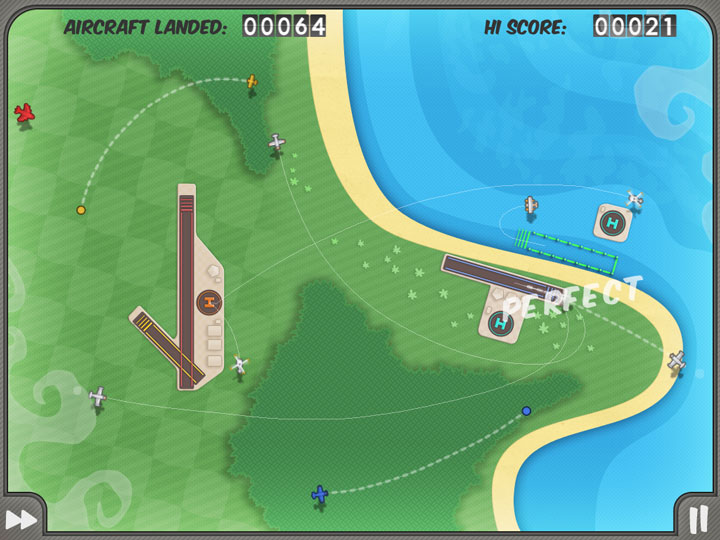
Flight Control - You are in charge. You have to get all those planes to the right runways without colliding with each other. Very fun and multiplayer is even more entertaining.

Tiny Tower - You are the landlord. Start with only one floor and build your empire one floor and one bitizen at a time. Probably my favorite game of 2011 on the iPhone. You play it when you have time and can check in on the game in a matter of moments.

Contre Jour - Another great navigate your blob around the screen. This game requires you to modify the surroundings to complete the level.

Cut the Rope - With a finger swipe you "Cut the Rope" and the trick is to feed your candy to the little green guy. The levels are fun and can prove challenging but highly recommend this game.

Jetpack Joyride - A great combination of racing through a level, seeing how far you can get with loads of customizations while trying to accomplish a well balanced set of unique goals with each run through the level. My favorite action game of the year on any smart-device!

Plants VS Zombies - If for some reason you haven't played this on any device...get this! You build up your defenses from a continuous onslaught of the undead!

Fruit Ninja - Chop the fruit as it comes flying on the screen. It can be very rewarding. Just avoid the bombs. Multiplayer is great fun as well.


How do you keep your kids entertained and educated?

Mathemagics: Mental Math Tricks - Anyone can benefit from keeping your mind agile by testing out your mental math skills.

>Sudoku - Is Sudoku plus a points system, runs and a leaderboard. Probably the nicest execution of Sudoku and it is FREE.

Star Walk - Point your iOS device at the sky and the app will tell you what you are looking at. Stars, constellations and even satellites all show up in real-time. This is a beautifully produced application for stargazing.

The Elements - Is an incredible recreation of the periodic tablet. Highly interactive and engaging. You will learn something new every time you open this app up.

Flashcards Deluxe - Make your own flashcards or download study sets online. Smart study system automatically focuses on cards you miss. Supports Quizlet.com and FlashcardExchange.com for 4 million+ flashcard sets.


How does an iDevice get you around?

Navigon - GPS app for your iDevice. You have Google Maps already on your device but this turns your phone or tablet into a real-time navigation system with turn notices, traffic and route finding. Worth the money!

Yelp - Brings the popular online site for crowd-sourcing/reviews of your local establishments. Helps you find "lunch", "dinner", "mexican" or any other venue nearby.

Opentable - This is a wonderful system that allows you to make reservations on your phone or tablet at your favorite local restaurants. The app includes reviews, menus and helps secure your reservation while you are on the move. You also earn points with each reservation that can be redeemed for credit that can be used at any Opentable compatible restaurant. I pretty much decide where we are going to eat nowadays based on where we can get a reservation.

Pageonce Trip Tracker - Made by the same people that make the Money and Bill's app above. This is a great app to get real-time flight status, itinerary push alerts, live weather, route maps, hotel information and car rental details...basically helps with all your travel needs.


How does the iPad keep you cooking?

Epicurious Recipes - From Epicurious.com search more than 30,000 delicious, professionally created recipes from Bon Appetit, Gourmet, Self, and renowned chefs and cookbooks.


Can the iPad help me shed pounds?

Fitness - Features 700+ exercises for men and women and 50 YOGA poses with video and audio instructions. App includes 700 videos and 40 ready-made workouts.


While this article has focused on what is available for the most sought after computing devices of the past couple years...the iPhone and more specifically, the iPad. It doesn't mean that the app isn't also available for Android smart-phones, Blackberry or even the Windows Phone and all are probably great apps no matter what platform you have. I just hope this is a good starting place for someone interested in getting the most out of their smart-device.

I'll endeavor to keep this list fresh and up-to-date as new and better apps come about or some of these get outdated. I would LOVE to hear about your favorite apps...comment below!

Enjoy your mobile computing experience and wishing you a Happy and Healthy 2012!


For additional details, check out my 2012 Consumer Product Trends, some additional summaries like this one for other product categories at WouldntMind.com and specific key product details coming out of CES 2012 at WouldntMind.com News Page.

LarryLarry Pacey, award-winning designer tracks the latest news on consumer products, electronics, appliances, smart devices, networking and the gadget lifestyle.
For the latest news follow me on:


------------------------------ OR -------------------------------


Please comment below and share your thoughts. If you have any feedback or questions, feel free to email me at wouldntmind@gmail.com.

Just my 2-cents,
Larry