





This morning Apple announced this summer's release of the Macintosh operating system...correction...they dropped the "Macintosh" in front of OS X! If you really look closely, this list of features are clearly inspired from efforts already well developed on the iOS based products like the iPhone and iPad.
Let's look at the new capabilities announced so far...
Messages
 The messaging client from your iPhone or iPad is now available for your Macintosh desktop and laptops. It provides a convient way to send unlimited messages to Macs, iPads, iPhone and iPod Touch's. You messages are synced across devices allowing you to maintain your conversation across your personal devices. Start the chat on your Mac and keep on chatting with your iPhone as you walk out of the house.
Messages include support for photos, videos, file attachments, your contacts as well as your location. And if you really need to take this conversation to another level...you can launch directly into FaceTime and hold a video call. These messages are not limited to iMessage but also supports other chat systems including AIM, Yahoo!, Google Talk and Jabber accounts...this way you can bring in all your friends.
The good news is that you can download the beta of Messages for your Mac today!
Reminders
 Another popular app I rely a great deal on my iPhone and iPad is Reminders. A very nice feature is the ability to not only the ability to maintain multiple lists of reminders/tasks but also the ability to set a due date OR even better an alert when you are at the location of the reminder. Say you want to be reminded to pick up some groceries. Make the list and put your grocery store location into the list. Then as you arrive, the list pops up on your iDevice! Very convenient...especially for an absent minded person like me ;-)
Now I can put items on my lists on all my Apple devices and they are synced together. Another great capability sewn together by Apple and their range of computing devices.
Notes
 Okay...by now you are starting to see where this is going, right? Make sure all your iDevice apps are able to be synced with your Macintosh. And while that isn't earth-shattering, it does solve a technical divide for those of us with iOS products and Macintosh computers. So Notes is right there. Now you can put together notes with text, pictures and the like and sync it across your devices.
Some unique aspects on the Macintosh is the ability to "Share" your notes with friends via Messages or Mail. You can also pin your notes to your desktop for easy access. And of course, your notes are synced, so they reside on all your devices.
Notification Center
 I know a lot of people that don't even know that their iOS device has this feature. When your phone or tablet is on, simply swipe your finger from the top of the screen downward and this info section will slide down and highlight all your notifications from multiple apps.
Well, now those notifications will be available on your Macintosh, you just swipe from the left. This will highlight conversations from the Messages application, your latest Mail, Calendar alerts and other application information.
Share Sheets
 Safari and other applications will now feature a greater range of options to share information as you run into noteworthy items. The usual stuff is there like posting pix to Flickr, videos to Vimeo and Twitter integration. You see it...you can share it.
Twitter
Tight Twitter integration affords you the ability to Tweet from anywhere. And get notifications of tweets about you no matter what application you are currently running.
Game Center
 Again, now that the Mac has its own App Store and games can be easily downloaded like an app on your iPhone. Now you can keep track of all your gaming activities and rankings via Apple's Game Center.
Not only does this track your progress but it also makes it easy to find friends and play multiplayer games.
AirPlay Mirroring
 I don't know about you but I have frequently wanted an easy, wireless way to get my content on the Macintosh onto my TV. Well, Apple has made it a bit simpler if you are into the whole Apple eco-system of platforms. AirPlay is the ability to stream content from your computing devices to an AppleTV device hooked up to your television. Now the Macintosh joins the fray with AirPlay Mirroring support. Stream movies, presentations, surf the web and other applications via this new AirPlay functionality and a nice HD television.
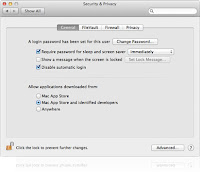 Gatekeeper
A new service to help protect your computer from malware you may download to run on your computer. It seems to really monitor new installs and make sure you know where they are coming from. One solution the application provides is the ability to control/limit where you download an application from. You can set your computer to only accept programs from Apple's Mac App Store. Or you can extend it to support applications from Apple's "known developers". And lastly, you can download from anywhere "at your own risk"!
iCloud
 Obviously a lot of the aforementioned functionality comes to your computer through Mountain Lion's tight integration with Apple's iCloud services. This cloud technology quietly syncs all your information into Apple's internet storage and transmits it to all your authorized devices so that you have one set of information...consistent across all your Apple products.
Conclusion
None of these new application features really standout as must-haves and it really seems to be a bit of a yawn. While I am an avid iPhone, iPad and Mac user...I have solutions for most of this functionality today.
First of all, I can download the beta of Messages. I rely on Evernote for syncing my notes across all my devices and the application is also available for PC and most web browsers. There is a Macintosh application called AirParrot that provides AirPlay functionality on the Macintosh. I do use Notes on my iPhone and iPad for their location based reminders and can live without Mac support or could move to one of the dozens of great reminder apps available for Mac, PC, browsers, Android and iOS devices.
The tighter integration of iCloud throughout the OS is probably the most promising functionality to be leveraged. More on this as I have time to work with the early developer release.
You can see Apple's video highlighting these new features below...
Let's look at the new capabilities announced so far...
Messages

Messages include support for photos, videos, file attachments, your contacts as well as your location. And if you really need to take this conversation to another level...you can launch directly into FaceTime and hold a video call. These messages are not limited to iMessage but also supports other chat systems including AIM, Yahoo!, Google Talk and Jabber accounts...this way you can bring in all your friends.
The good news is that you can download the beta of Messages for your Mac today!
Reminders

Now I can put items on my lists on all my Apple devices and they are synced together. Another great capability sewn together by Apple and their range of computing devices.
Notes

Some unique aspects on the Macintosh is the ability to "Share" your notes with friends via Messages or Mail. You can also pin your notes to your desktop for easy access. And of course, your notes are synced, so they reside on all your devices.
Notification Center

Well, now those notifications will be available on your Macintosh, you just swipe from the left. This will highlight conversations from the Messages application, your latest Mail, Calendar alerts and other application information.
Share Sheets

Tight Twitter integration affords you the ability to Tweet from anywhere. And get notifications of tweets about you no matter what application you are currently running.
Game Center

Not only does this track your progress but it also makes it easy to find friends and play multiplayer games.
AirPlay Mirroring

 Gatekeeper
A new service to help protect your computer from malware you may download to run on your computer. It seems to really monitor new installs and make sure you know where they are coming from. One solution the application provides is the ability to control/limit where you download an application from. You can set your computer to only accept programs from Apple's Mac App Store. Or you can extend it to support applications from Apple's "known developers". And lastly, you can download from anywhere "at your own risk"!
iCloud

Conclusion
None of these new application features really standout as must-haves and it really seems to be a bit of a yawn. While I am an avid iPhone, iPad and Mac user...I have solutions for most of this functionality today.
First of all, I can download the beta of Messages. I rely on Evernote for syncing my notes across all my devices and the application is also available for PC and most web browsers. There is a Macintosh application called AirParrot that provides AirPlay functionality on the Macintosh. I do use Notes on my iPhone and iPad for their location based reminders and can live without Mac support or could move to one of the dozens of great reminder apps available for Mac, PC, browsers, Android and iOS devices.
The tighter integration of iCloud throughout the OS is probably the most promising functionality to be leveraged. More on this as I have time to work with the early developer release.
So as it stands, I am not sold on this offering. It really feels like some of those old Microsoft updates where they just took ideas from other company's applications and integrated into their OS. Apple may have some other tricks up its sleeve as we get closer to the late summer rollout date. I certainly hope so.
You can see Apple's video highlighting these new features below...
 Larry Pacey, award-winning designer tracks the latest news on consumer products, electronics, appliances, smart devices, networking and the gadget lifestyle. |
For the latest news follow me on:
------------------------------ OR ------------------------------- Follow me on Twitter @WouldntMindThis Please comment below and share your thoughts. If you have any feedback or questions, feel free to email me at wouldntmind@gmail.com. Just my 2-cents,
Larry
|


